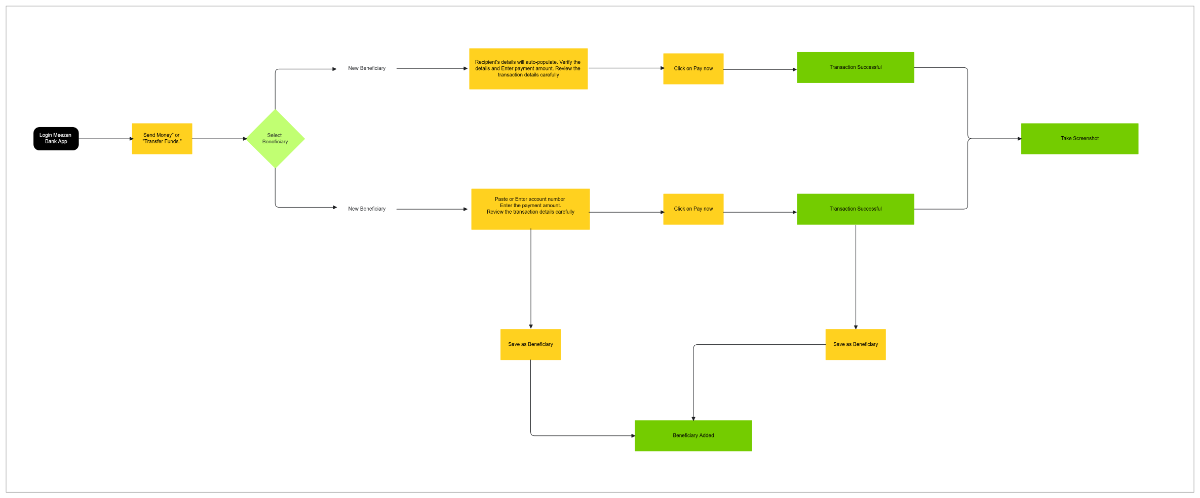
This template outlines a user flow for a money transfer application, specifically focusing on the process of sending funds to a beneficiary. The flow begins with two initial steps: "Login / Maintain Bank App" (black rectangle) and "Send Money / Transfer Funds" (orange rectangle).
The process then branches at a "Select Beneficiary" (green diamond) decision point. If an "Existing Beneficiary" is selected, the user proceeds to "Recipients details will auto-populate. Verify the details and enter payment amount. Review the transaction details carefully" (yellow rectangle). This is followed by "Click on Pay now" (yellow rectangle) and a "Transaction Successful" (green rectangle) confirmation.
Alternatively, if a "New Beneficiary" is chosen, the user must "Paste or Enter account number. Enter the payment amount. Review the transaction details carefully" (yellow rectangle). This path also leads to "Click on Pay now" and "Transaction Successful." After the successful transaction, for a new beneficiary, there's an option to "Save as Beneficiary" (yellow rectangle), leading to a "Beneficiary Added" (green rectangle) confirmation. Both successful transaction paths converge to a final "Take Screenshot" (green rectangle) step. This template provides a clear, step-by-step visual representation of a critical banking application process, highlighting decisions and outcomes.