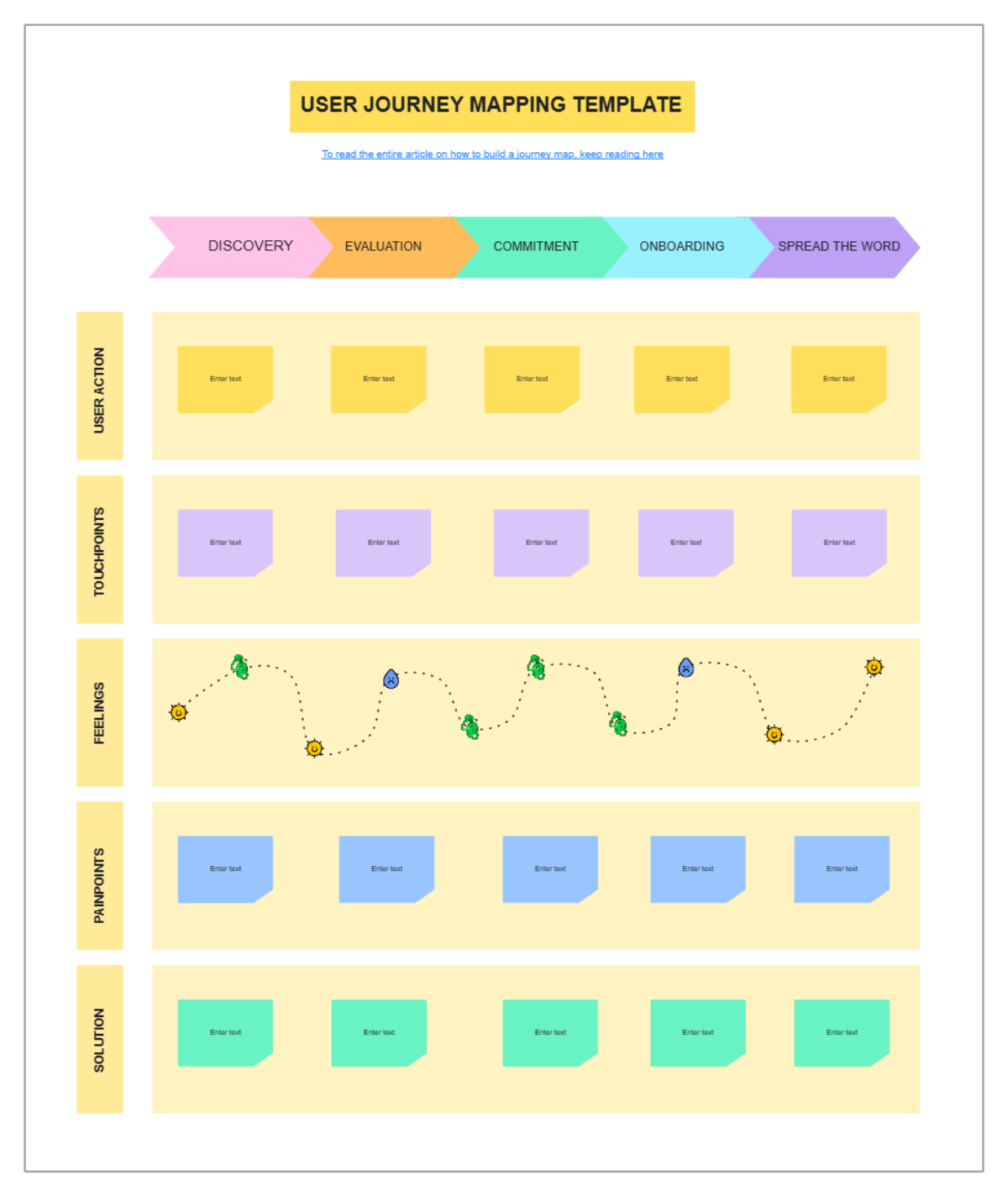
This template is a "USER JOURNEY MAPPING TEMPLATE" by Looppanel, designed to visualize and analyze user experiences across key stages. A link at the top provides access to a full article on how to build a journey map.
The horizontal axis features five distinct "DISCOVERY," "EVALUATION," "COMMITMENT," "ONBOARDING," and "SPREAD THE WORD," each represented by a color-coded arrow (pink, orange, teal, blue, purple) indicating a sequential flow.
The vertical axis (rows) focuses on various aspects of the user journey: "User action," "Touchpoints," "Feelings," "Painpoints," and "Solution."
The "User action" row contains yellow sticky notes, "Touchpoints" uses pink sticky notes, "Painpoints" uses blue, and "Solution" uses green, all with placeholder dashes for content. The "Feelings" row stands out with a dotted purple line graph adorned with small, colorful icons (stars, leaves, circles), visually representing the user's emotional journey—likely indicating positive or negative sentiment changes throughout the stages. This template provides a structured, color-coded, and visually engaging framework for understanding user behavior, emotions, and touchpoints, enabling the identification of pain points and the formulation of solutions to improve the overall user experience.