Free Task Planner

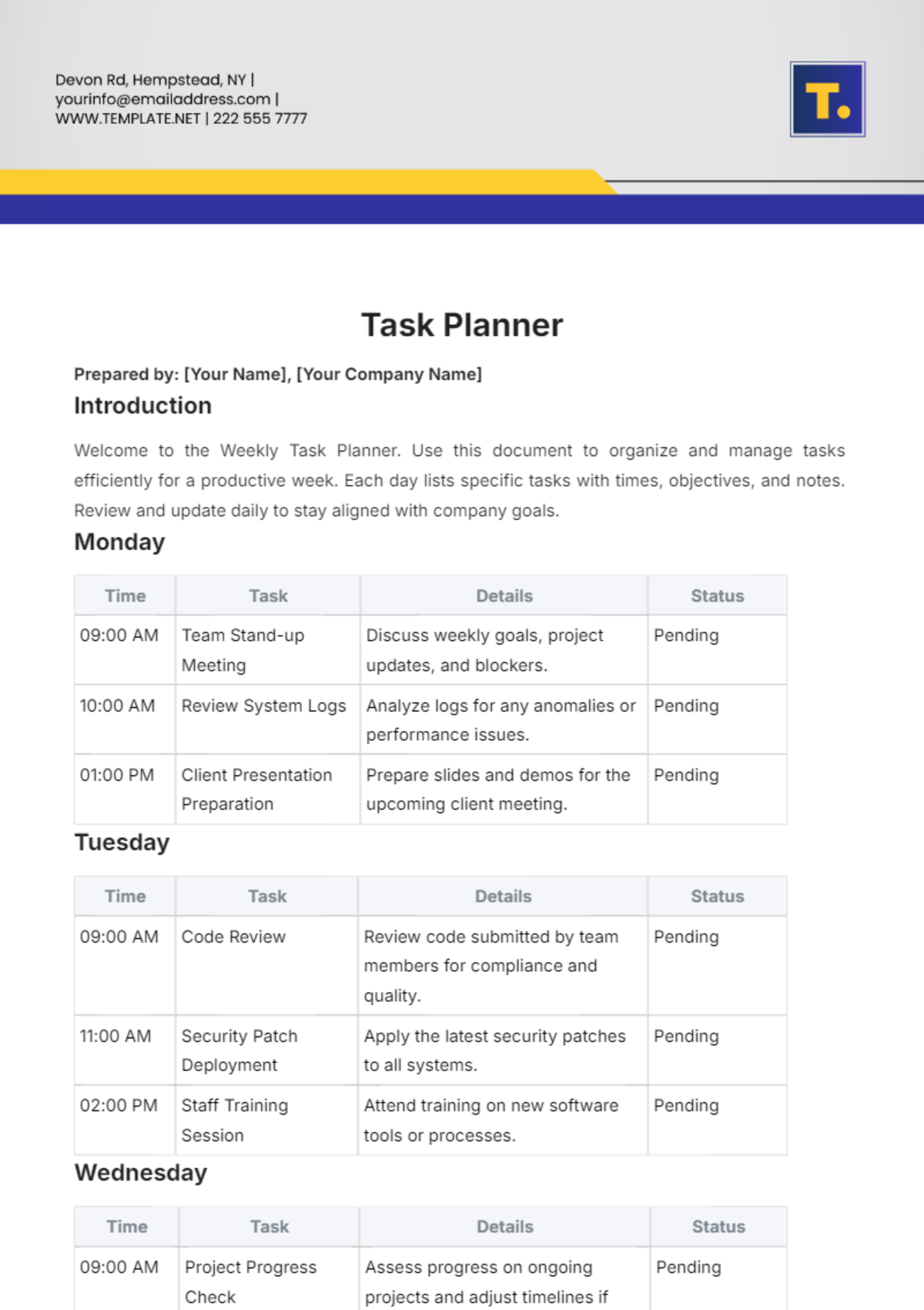
Welcome to the Weekly Task Planner. Use this document to organize and manage tasks efficiently for a productive week. Each day lists specific tasks with times, objectives, and notes. Review and update daily to stay aligned with company goals.
Monday
Time | Task | Details | Status |
|---|---|---|---|
09:00 AM | Team Stand-up Meeting | Discuss weekly goals, project updates, and blockers. | |
10:00 AM | Review System Logs | Analyze logs for any anomalies or performance issues. | |
01:00 PM | Client Presentation Preparation | Prepare slides and demos for the upcoming client meeting. |
Tuesday
Time | Task | Details | Status |
|---|---|---|---|
09:00 AM | Code Review | Review code submitted by team members for compliance and quality. | |
11:00 AM | Security Patch Deployment | Apply the latest security patches to all systems. | |
02:00 PM | Staff Training Session | Attend training on new software tools or processes. |
Wednesday
Time | Task | Details | Status |
|---|---|---|---|
09:00 AM | Project Progress Check | Assess progress on ongoing projects and adjust timelines if needed. | |
12:00 PM | Lunch & Learn Session | Participate in a knowledge-sharing session with the team. | |
03:00 PM | Backup Systems Testing | Verify the integrity and functionality of backup systems. |
Thursday
Time | Task | Details | Status |
|---|---|---|---|
10:00 AM | Client Meeting | Present project updates and gather feedback from the client. | |
01:00 PM | Documentation Review | Review and update project documentation and technical specs. | |
03:00 PM | Development Sprint Planning | Plan the next sprint cycle and set goals for the development team. |
Friday
Time | Task | Details | Status |
|---|---|---|---|
09:00 AM | Weekly Report Compilation | Compile and submit the weekly report to the management. | |
11:00 AM | End-of-Week Review | Reflect on the week’s achievements and plan for improvements. | |
03:00 PM | Team Wrap-Up Meeting | The final team meeting will review accomplishments and address any remaining issues. |
Notes
Follow-Up Actions: Make sure to address any action items identified during meetings and review sessions.
Additional Resources: Utilize [Your Company Website] for access to project documentation and training materials.
For any inquiries, please contact [Your Email] or [Your Company Email]. If you have any concerns about the schedule or tasks, feel free to reach out.
- 100% Customizable, free editor
- Access 1 Million+ Templates, photo’s & graphics
- Download or share as a template
- Click and replace photos, graphics, text, backgrounds
- Resize, crop, AI write & more
- Access advanced editor
Manage tasks efficiently with the Task Planner Template, offered by Template.net. This customizable and printable template is easily downloadable and editable in our AI Editor Tool. It features a structured format for organizing tasks, setting deadlines, and tracking progress, ensuring clear, professional, and efficient task management for personal or professional projects.
You may also like
- Aesthetic Planner
- Hourly Planner
- Daily Planner
- Weekly Planner
- Monthly Planner
- Planners Yearly
- Event Planner
- Project Planner
- Calendar Planner
- Student Planner
- School Planner
- Teacher Planner
- Kawaii Planner
- Budget Planner
- Life Planner
- Meal Planner
- Study Planner
- Business
- Workout Planner
- Work Schedule Planner
- Party Planner
- Social Media Planner
- Baby Shower Planner
- Book Planner
- Planner Cover
- Debt Planner
- Desk Planner
- Diet Planner
- Family Planner
- Fitness Planner
- Goal Planner
- Health Planner
- Medical Planner
- Holiday Planner
- Homework Planner
- Itinerary Planner
- Journal Planner
- Personal Planner
- Route Planner
- Smart Goal Planner
- Travel Planner
- Wedding Planeer