Free Operational Workflow

I. Introduction
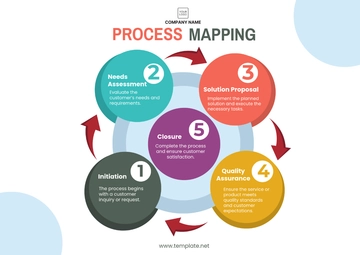
This workflow outlines the process for managing customer service inquiries from receipt to resolution within [Your Company Name]. The goal is to ensure that all inquiries are addressed efficiently, leading to high customer satisfaction.
II. Steps
Step | Action | Responsible Party | Tool/ Platform |
|---|---|---|---|
1. Receiving Inquiries | Customer submits an inquiry via email, phone, or online form. | Customer Service Representative (CSR) | CRM system |
2. Logging Inquiry | CSR logs the inquiry into the CRM system, categorizing it based on the issue. | CSR | CRM system |
3. Acknowledging Receipt | CSR sends an acknowledgment email to the customer with an estimated response time. | CSR | Email system |
4. Assigning Inquiry | CSR reviews and assigns the inquiry to the appropriate team or specialist. | CSR | CRM system |
5. Resolving Inquiry | Assigned team or specialist provides a resolution and updates the CRM system. | Specialist/Team | CRM system |
6. Communicating Resolution | CSR contacts the customer to provide the resolution or request more information if needed. | CSR | Email/Phone |
7. Closing Inquiry | CSR updates the CRM system to close the inquiry once resolved. | CSR | CRM system |
8. Follow-Up | CSR conducts a follow-up survey or call to ensure satisfaction and gather feedback. | CSR | Survey tool/Phone |
III. Key Performance Indicators (KPIs)
Average response time
Resolution time
Customer satisfaction score
Number of inquiries resolved on first contact
IV. Review and Improvement
Action: Regularly review workflow efficiency and customer feedback to identify areas for improvement.
Responsible Party: Customer Service Manager.
Frequency: Quarterly.
- 100% Customizable, free editor
- Access 1 Million+ Templates, photo’s & graphics
- Download or share as a template
- Click and replace photos, graphics, text, backgrounds
- Resize, crop, AI write & more
- Access advanced editor
Make your business procedures more efficient and well-organized by using our Operational Workflow Template. Using Template.net's AI Editor Tool, you can fully change and customize this template to help you efficiently and clearly plan out workflows. Perfect for companies who want to monitor progress, guarantee departmental consistency, and increase operational efficiency.