


![How to Add a Signature in Microsoft Forms [Templates + Examples] 2026](https://images.template.net/wp-content/uploads/2022/07/How-to-Add-a-Signature-in-Microsoft-Forms-Templates-Examples-2023-788x443.jpg)
How to Add a Signature in Microsoft Forms [Templates + Examples] 2026
Signatures found in documents establish who you are as an individual or as an organization. Aside from the fact that…
Dec 22, 2025


Sep 02, 2025
Microsoft Forms offers users the opportunity to set a time limit with the forms they have created. Professors and lecturers preparing the online quizzes can set the time limit so students can promptly send their answers back without any delay.
Setting a time limit is accessible regardless of the length of the form you have made or the purpose of what it would serve. The main goal of it after all is so that intended students can answer it concisely and without any availability to check other resources or source materials.
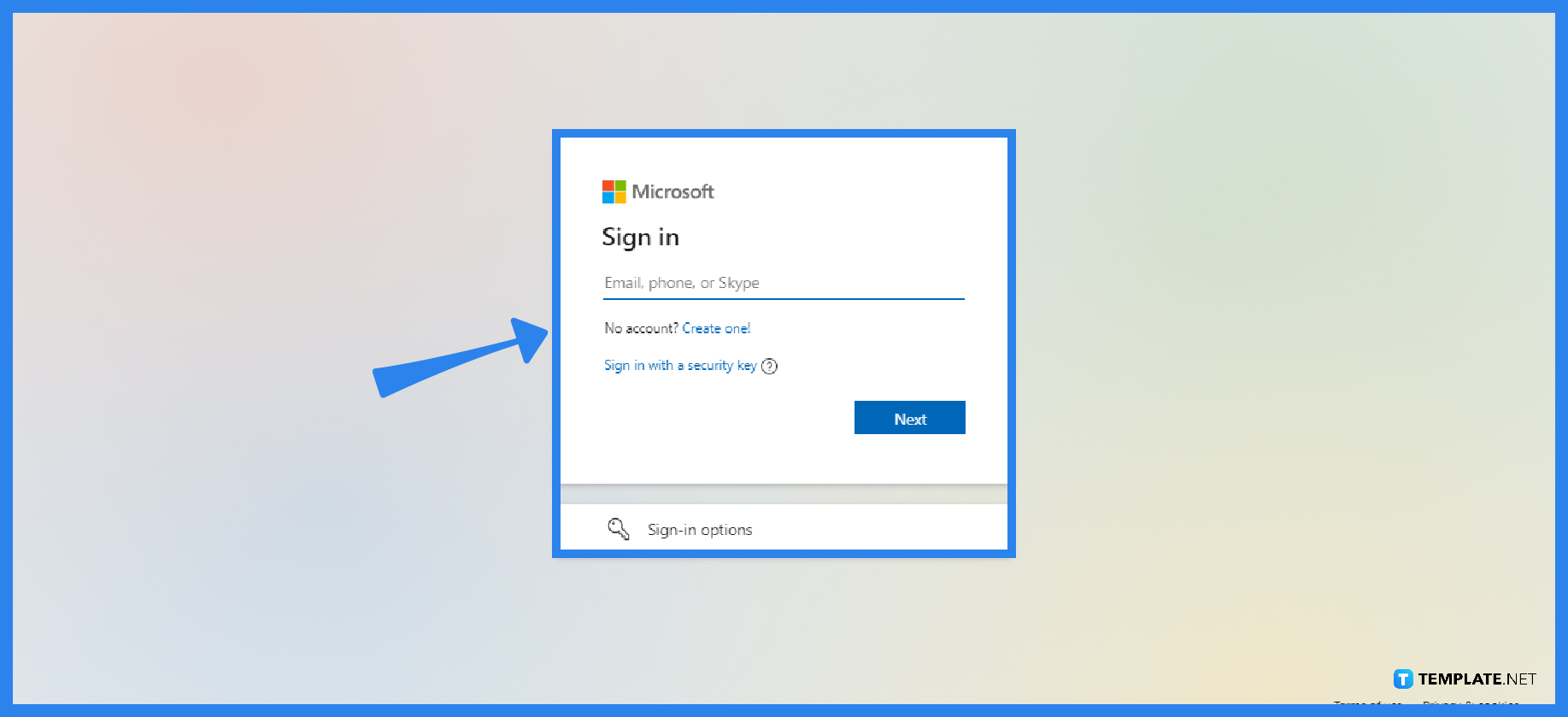
After you have proceeded to the Microsoft Forms site, locate the ‘sign in’ button at the top right corner. As you are redirected to a new page, input your personal or official school login information so you can have access to the forms or quizzes you have made.
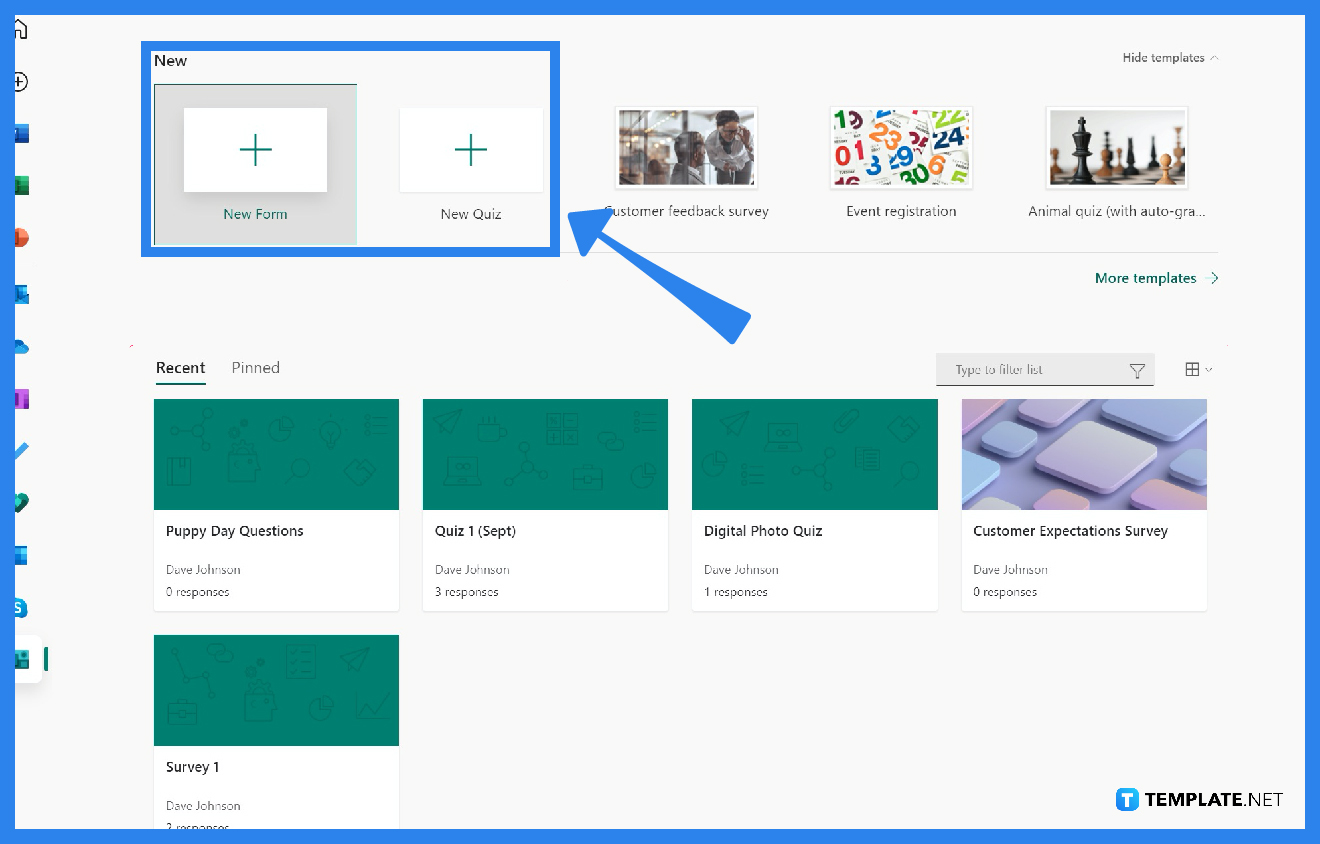
Peruse the various forms you have made and carefully select the specific form you want to share with your students. Check the contents to whether there are no more revisions needed.
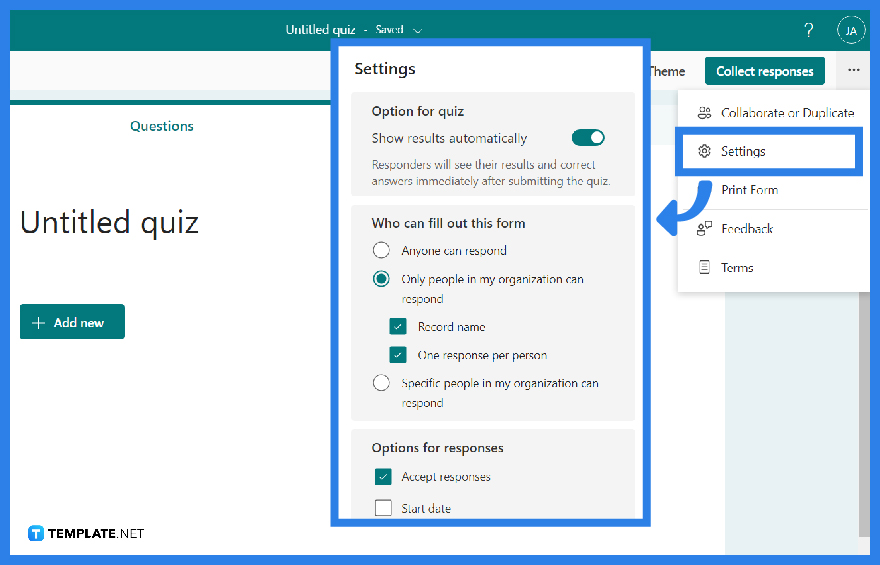
As you open up your selected quiz, proceed to the ellipse at the top right-most corner where a drop-down box will appear filled, click on ‘Settings’. Additional specifics will be seen so you can customize further your form.
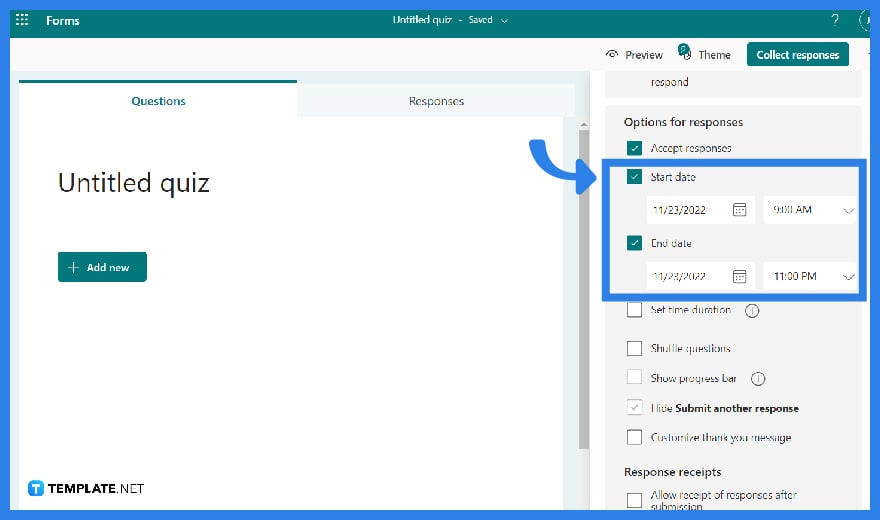
You may set an exact day and time to begin and stop collecting form answers. Click on ‘Start Date’ to proceed with selecting a date from the calendar control in the date text field. Choose an hour from the drop-down list of hour increments. Then repeat the process for the End Date.
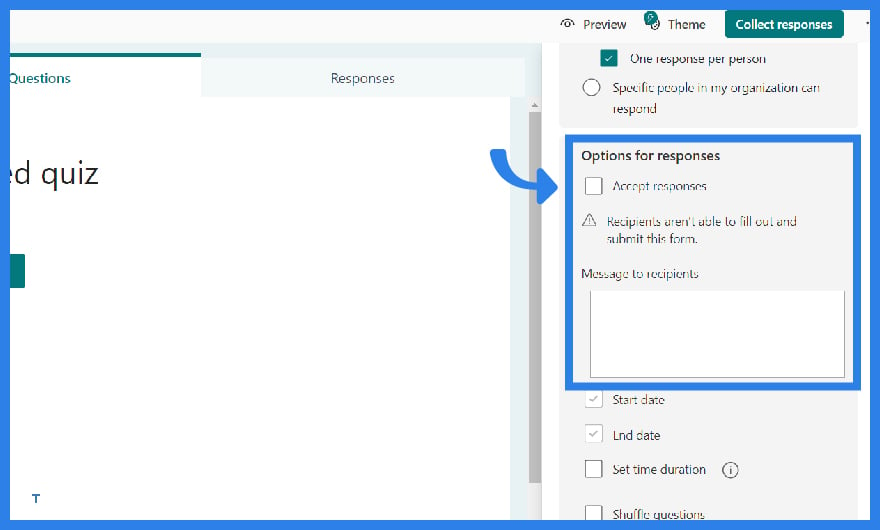
Other than setting the end date, you have the option to manually turn off accepting submissions. Return to ‘Settings’ and uncheck the accept answers box to disable form or quiz submissions. An empty text box will appear in which you may type a personalized message to the recipients.
Yes, free users of Microsoft Forms can have a limit on the number of responses to 1,000 whereas premium users can add to receive more responses.
The character limit for replies is 4000 which includes space; the only difference is that long answers will modify the size of the text box to display all of the text but short answers will no longer adjust the box display.
Students will be given a time limit of 30 minutes to complete all of the questions. If not, the response will be delivered automatically after the timer expires.
If you want people to fill out and submit a form, it will not work unless there is a network or wifi connection to the server; therefore, it must be operated in browsers on desktop and mobile devices.
As you go to the ‘more settings for this question’ on the bottom right of the question, locate restrictions, and choose the specific preference such as numbers, greater than, less than, and so on.

Signatures found in documents establish who you are as an individual or as an organization. Aside from the fact that…
![How To Make/Create a Newsletter in Microsoft Outlook [Templates + Examples] 2026](https://images.template.net/wp-content/uploads/2022/07/How-to-Start-a-Newsletter-with-Microsoft-Outlook-788x443.jpg)
Newsletters enable companies and organizations to communicate relevant and helpful information to their client, prospects, and subscribers. By giving you…
![How To Make/Create a Booklet in Microsoft Publisher [Templates + Examples] 2026](https://images.template.net/wp-content/uploads/2022/08/How-To-Make_Create-a-Booklet-in-Microsoft-Publisher-788x443.png)
Booklet templates are pre-designed layouts that make it easy to create a professional-looking booklet. They typically include placeholders for text…
![How To Make/Create a Booklet in Microsoft PowerPoint [Templates + Examples] 2026](https://images.template.net/wp-content/uploads/2022/07/How-To-Make-Create-a-Booklet-in-Microsoft-PowerPoint-788x443.jpg)
Booklets can be created in Microsoft PowerPoint, which offers a design feature that allows users to display them in PPT…
![How to Automatically Fill PDF Forms Using Microsoft Excel [Templates + Examples] 2026](https://images.template.net/wp-content/uploads/2022/07/How-to-Automatically-Fill-PDF-Forms-Using-Microsoft-Excel-788x444.png)
Automatically fill PDF forms using Microsoft Excel so you won’t have to save multiple PDF forms in an Excel spreadsheet…
![How to Make/Create a Floor Plan on Microsoft Excel [Templates + Examples] 2026](https://images.template.net/wp-content/uploads/2022/07/How-to-Make-a-Floor-Plan-on-Microsoft-Excel-788x443.jpg)
Floor plans either make or break projects related to engineering and architecture. That being said, every apartment room, bedroom, living…
![How to Make/Create a Grid in Microsoft Word [Templates + Examples] 2026](https://images.template.net/wp-content/uploads/2022/07/How-to-Make_Create-a-Grid-in-Microsoft-Word-788x444.jpg)
Grids consist of a network of lines that work as graphic cues while formatting your document in Microsoft Office. If…
![How to Add More Highlight Colors to Microsoft Word [Templates + Examples] 2026](https://images.template.net/wp-content/uploads/2022/07/How-to-Add-More-Highlight-Colors-to-Microsoft-Word-Templates-Examples-2023-788x443.jpg)
Add more highlight colors to Microsoft Word so you won’t have to settle with the default shading color in marking…
![How to Make/Create a Border in Microsoft Publisher [Templates + Examples] 2026](https://images.template.net/wp-content/uploads/2022/08/How-to-MakeCreate-a-Border-in-Microsoft-Publisher-788x444.png)
Borders are graphic design elements that make a document more pleasing and stylish to look at. This can be used…