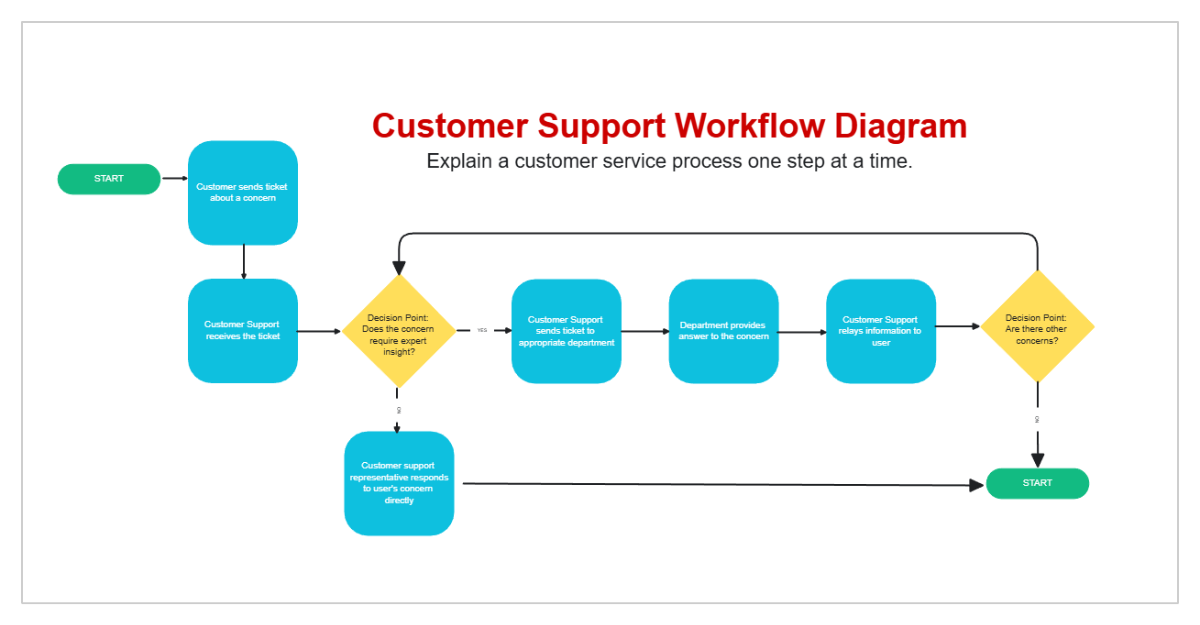
This Customer Support Workflow Diagram template features a vibrant pink header and a structured flowchart designed to explain service processes step-by-step. The sequence begins with a "Start" button, leading to initial actions where a customer sends a ticket and support receives it. A yellow diamond-shaped decision point asks if expert insight is required; a "No" leads to a direct response, while a "Yes" routes the ticket through specialized departments for resolution. The flow includes teal action boxes and a second decision point to check for additional concerns, eventually concluding at a "Finish" button. Visual accents like a star, a thumbs-up icon, and yellow sticky notes provide space for extra guidance or emphasis. Overall, this template offers a clear, professional layout for documenting and improving customer service efficiency.