


![How to Add a Signature in Microsoft Forms [Templates + Examples] 2026](https://images.template.net/wp-content/uploads/2022/07/How-to-Add-a-Signature-in-Microsoft-Forms-Templates-Examples-2023-788x443.jpg)
How to Add a Signature in Microsoft Forms [Templates + Examples] 2026
Signatures found in documents establish who you are as an individual or as an organization. Aside from the fact that…
Dec 22, 2025


Sep 02, 2025
Microsoft Visio lets you create professional diagrams and flowcharts for various purposes and occasions. It also enables you to collaborate and edit drawings with other people to save time and elevate group productivity.
Even in diagrams or flowcharts, subscripts and superscripts are used to complete texts. This article will discuss the four ways to add subscripts and superscripts to Microsoft Visio.
Because technology is grounded on convenience and efficiency, systems and processes are given shortened versions to maintain these values. Adding a subscript or superscript through keyboard shortcuts is relatively the easiest among these ways. To add a superscript, select the text you want to format then press CTRL and the Plus sign (+) at the same time while to add a subscript press, at the same time, CTRL and the Equals sign (=).
Another way to add subscripts and superscripts to Visio is through the Font Dialog Box Launcher. In the Font group, which is located on the Home tab, in the Font Dialog Box Launcher that you need to click after highlighting the text you want to format. The launcher is a small arrow pointing down that is below the icon for changing the text color. After clicking the launcher, go to the Font tab and tick the boxes for Superscript and Subscript which are under Effects.
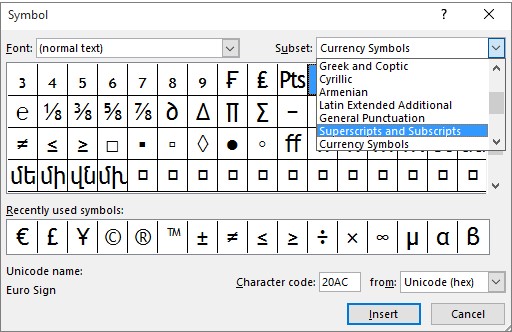
To insert a subscript or superscript, click on the side of a word or letter where you want the symbol to be placed. Then click the Symbol on the Insert tab and select (normal text) in the Font drop-down list. After, select the Superscripts and Subscripts in the Subset drop-down list, click the symbol you want, and then press Insert.
The previous procedures are practiced using Windows. To insert subscripts and superscripts on the Web, on the other hand, highlight the text or character you want then, on the Home tab, select the ellipses button or the More Font Options. After, select Subscript and Superscript from the Menu.
You can use subscripts or superscripts when adding copyright or trademark, or when you want to have a footnote on a document.
A subscript is when a character or a symbol is slightly lower than the character beside it while a superscript is when a character is slightly above another character.
To make a text subscript or superscript without changing its font size, you can either enter a higher or lower percentage in the Offset box.
You can undo a superscript or subscript formatting by highlighting or selecting the text and then pressing CTRl+Spacebar.
To insert superscript or subscript symbol in macOS, click Symbol on the Insert tab then scroll to find Letterlike Symbols and select the symbol you want to insert on the text.

Signatures found in documents establish who you are as an individual or as an organization. Aside from the fact that…
![How To Make/Create a Newsletter in Microsoft Outlook [Templates + Examples] 2026](https://images.template.net/wp-content/uploads/2022/07/How-to-Start-a-Newsletter-with-Microsoft-Outlook-788x443.jpg)
Newsletters enable companies and organizations to communicate relevant and helpful information to their client, prospects, and subscribers. By giving you…
![How To Make/Create a Booklet in Microsoft Publisher [Templates + Examples] 2026](https://images.template.net/wp-content/uploads/2022/08/How-To-Make_Create-a-Booklet-in-Microsoft-Publisher-788x443.png)
Booklet templates are pre-designed layouts that make it easy to create a professional-looking booklet. They typically include placeholders for text…
![How To Make/Create a Booklet in Microsoft PowerPoint [Templates + Examples] 2026](https://images.template.net/wp-content/uploads/2022/07/How-To-Make-Create-a-Booklet-in-Microsoft-PowerPoint-788x443.jpg)
Booklets can be created in Microsoft PowerPoint, which offers a design feature that allows users to display them in PPT…
![How to Automatically Fill PDF Forms Using Microsoft Excel [Templates + Examples] 2026](https://images.template.net/wp-content/uploads/2022/07/How-to-Automatically-Fill-PDF-Forms-Using-Microsoft-Excel-788x444.png)
Automatically fill PDF forms using Microsoft Excel so you won’t have to save multiple PDF forms in an Excel spreadsheet…
![How to Make/Create a Floor Plan on Microsoft Excel [Templates + Examples] 2026](https://images.template.net/wp-content/uploads/2022/07/How-to-Make-a-Floor-Plan-on-Microsoft-Excel-788x443.jpg)
Floor plans either make or break projects related to engineering and architecture. That being said, every apartment room, bedroom, living…
![How to Make/Create a Grid in Microsoft Word [Templates + Examples] 2026](https://images.template.net/wp-content/uploads/2022/07/How-to-Make_Create-a-Grid-in-Microsoft-Word-788x444.jpg)
Grids consist of a network of lines that work as graphic cues while formatting your document in Microsoft Office. If…
![How to Add More Highlight Colors to Microsoft Word [Templates + Examples] 2026](https://images.template.net/wp-content/uploads/2022/07/How-to-Add-More-Highlight-Colors-to-Microsoft-Word-Templates-Examples-2023-788x443.jpg)
Add more highlight colors to Microsoft Word so you won’t have to settle with the default shading color in marking…
![How to Make/Create a Border in Microsoft Publisher [Templates + Examples] 2026](https://images.template.net/wp-content/uploads/2022/08/How-to-MakeCreate-a-Border-in-Microsoft-Publisher-788x444.png)
Borders are graphic design elements that make a document more pleasing and stylish to look at. This can be used…