


![How to Add a Signature in Microsoft Forms [Templates + Examples] 2026](https://images.template.net/wp-content/uploads/2022/07/How-to-Add-a-Signature-in-Microsoft-Forms-Templates-Examples-2023-788x443.jpg)
How to Add a Signature in Microsoft Forms [Templates + Examples] 2026
Signatures found in documents establish who you are as an individual or as an organization. Aside from the fact that…
Dec 22, 2025


Sep 02, 2025
Collaborating with the whole team to work on various projects has never been this convenient with Microsoft SharePoint. And with SharePoint, managing and storing documents online are also easy and possible.
Communicating with a group of people regarding a set goal is much more convenient when done in one space and in real-time. The following steps will guide you in adding a chat on Microsoft SharePoint:
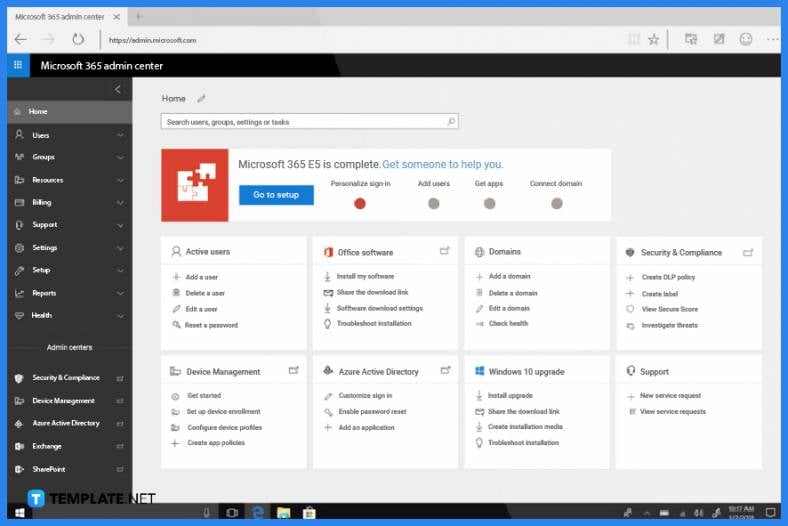
To be able to add a Microsoft Team on SharePoint, you need to log in to Office 365 Admin Center as an administrator. The options to add a chat on Microsoft SharePoint can only be accessible on this page. Moreover, only site owners or administrators can add a Microsoft Team.
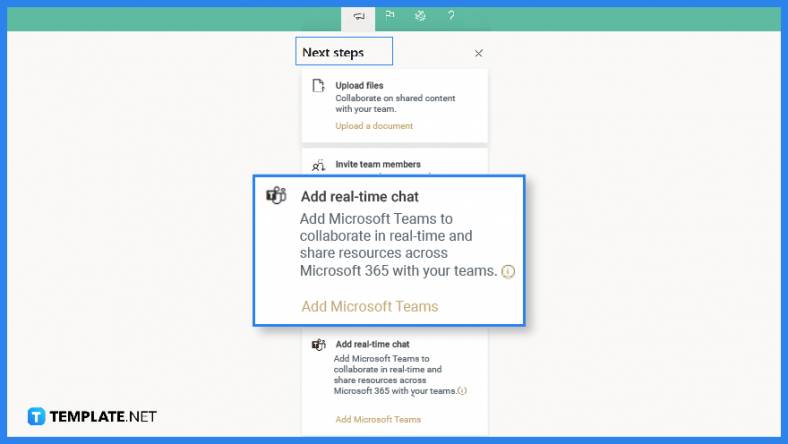
Locate a group-connected team site that you own and, in the lower left corner of your site’s page, select Add Real-Time Chat. You can also find this option in the “Next Step” which can be accessed from the upper right corner of the team site. Once Add Real-Time Chat is selected, a panel will open; this panel will walk you, the site owner, through a quick tour of the capability of Microsoft Team and its value being added in SharePoint.
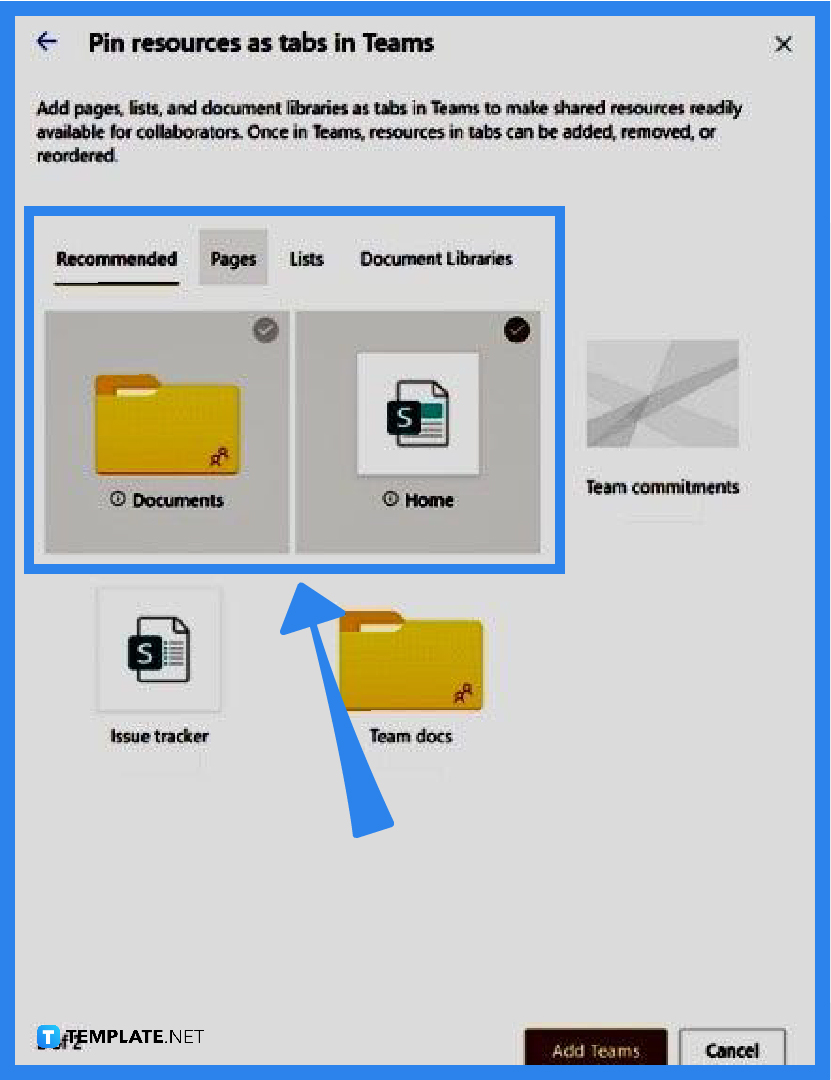
After continuing with the addition of real-time chat, you need to see options of what SharePoint resources to add as tabs in Microsoft Team. In this window, you can select pages, lists, and document libraries among others that you can add to Team. These will enable you and your team to work on a document or task in one place.
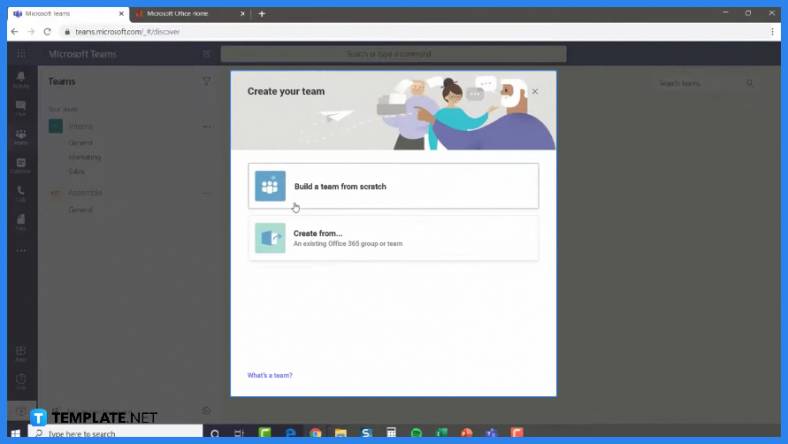
To create your Team channel, select Add Teams—this will contain the resources you have selected as tabs. Microsoft Teams will be launched automatically once your team is created and this will take you to your new Team channel. Afterward, you can add or remove sites connected to this Office 365 group.
Adding a chat or Microsoft Team is an important feature in Microsoft SharePoint because this allows team members to communicate and work on documents in one place and in real time.
Besides real-time chatting, a team can also do online calling, screen sharing, and web conferencing with Microsoft Teams in SharePoint.
Only site owners can add Microsoft Teams, as well as SharePoint resources as tabs, in SharePoint.
With the addition of the Microsoft Team on your site, collaborating with files from Microsoft apps like Excel and Word would be easier.
Adding real-time chat to Microsoft SharePoint enables the team to develop and acquire opportunities to develop social channels that encourage team building and community.

Signatures found in documents establish who you are as an individual or as an organization. Aside from the fact that…
![How To Make/Create a Newsletter in Microsoft Outlook [Templates + Examples] 2026](https://images.template.net/wp-content/uploads/2022/07/How-to-Start-a-Newsletter-with-Microsoft-Outlook-788x443.jpg)
Newsletters enable companies and organizations to communicate relevant and helpful information to their client, prospects, and subscribers. By giving you…
![How To Make/Create a Booklet in Microsoft Publisher [Templates + Examples] 2026](https://images.template.net/wp-content/uploads/2022/08/How-To-Make_Create-a-Booklet-in-Microsoft-Publisher-788x443.png)
Booklet templates are pre-designed layouts that make it easy to create a professional-looking booklet. They typically include placeholders for text…
![How To Make/Create a Booklet in Microsoft PowerPoint [Templates + Examples] 2026](https://images.template.net/wp-content/uploads/2022/07/How-To-Make-Create-a-Booklet-in-Microsoft-PowerPoint-788x443.jpg)
Booklets can be created in Microsoft PowerPoint, which offers a design feature that allows users to display them in PPT…
![How to Automatically Fill PDF Forms Using Microsoft Excel [Templates + Examples] 2026](https://images.template.net/wp-content/uploads/2022/07/How-to-Automatically-Fill-PDF-Forms-Using-Microsoft-Excel-788x444.png)
Automatically fill PDF forms using Microsoft Excel so you won’t have to save multiple PDF forms in an Excel spreadsheet…
![How to Make/Create a Floor Plan on Microsoft Excel [Templates + Examples] 2026](https://images.template.net/wp-content/uploads/2022/07/How-to-Make-a-Floor-Plan-on-Microsoft-Excel-788x443.jpg)
Floor plans either make or break projects related to engineering and architecture. That being said, every apartment room, bedroom, living…
![How to Make/Create a Grid in Microsoft Word [Templates + Examples] 2026](https://images.template.net/wp-content/uploads/2022/07/How-to-Make_Create-a-Grid-in-Microsoft-Word-788x444.jpg)
Grids consist of a network of lines that work as graphic cues while formatting your document in Microsoft Office. If…
![How to Add More Highlight Colors to Microsoft Word [Templates + Examples] 2026](https://images.template.net/wp-content/uploads/2022/07/How-to-Add-More-Highlight-Colors-to-Microsoft-Word-Templates-Examples-2023-788x443.jpg)
Add more highlight colors to Microsoft Word so you won’t have to settle with the default shading color in marking…
![How to Make/Create a Border in Microsoft Publisher [Templates + Examples] 2026](https://images.template.net/wp-content/uploads/2022/08/How-to-MakeCreate-a-Border-in-Microsoft-Publisher-788x444.png)
Borders are graphic design elements that make a document more pleasing and stylish to look at. This can be used…