


![How to Add a Signature in Microsoft Forms [Templates + Examples] 2026](https://images.template.net/wp-content/uploads/2022/07/How-to-Add-a-Signature-in-Microsoft-Forms-Templates-Examples-2023-788x443.jpg)
How to Add a Signature in Microsoft Forms [Templates + Examples] 2026
Signatures found in documents establish who you are as an individual or as an organization. Aside from the fact that…
Dec 22, 2025


Sep 02, 2025
Microsoft Teams is a digital collaboration software that allows users to interact with one another via Microsoft Teams. Due to the social nature of this software, there may be some instances where the user will interact with someone they may find disturbing or hostile.
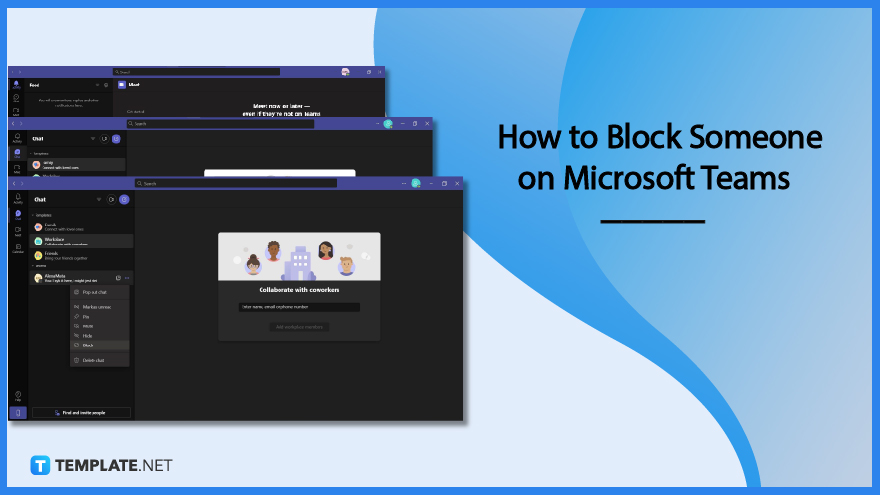
Blocking a person in this context prevents the blocked person from directly interacting, messaging, and tagging the user while they are using Microsoft Teams. This software allows the user to block people they do not want to communicate with from their contact lists in one go.
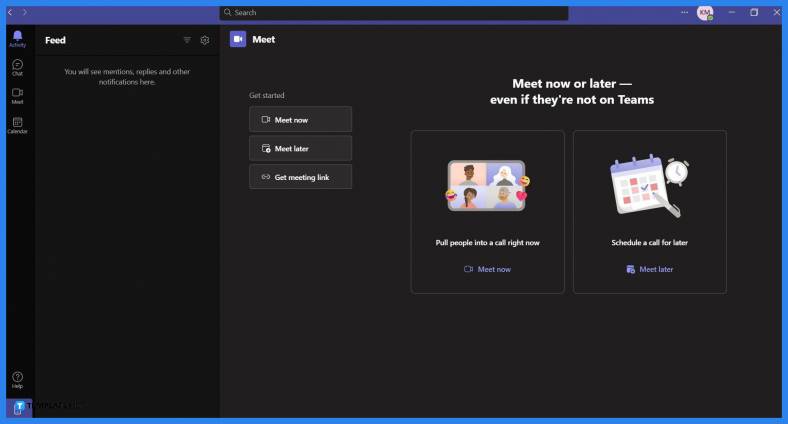
Any version of Microsoft Teams allows the user to block anyone on their Microsoft Office contacts list. Begin by launching Microsoft Teams on the desktop, and signing in to the Microsoft Office account with the person the user wants to block from their contacts list.
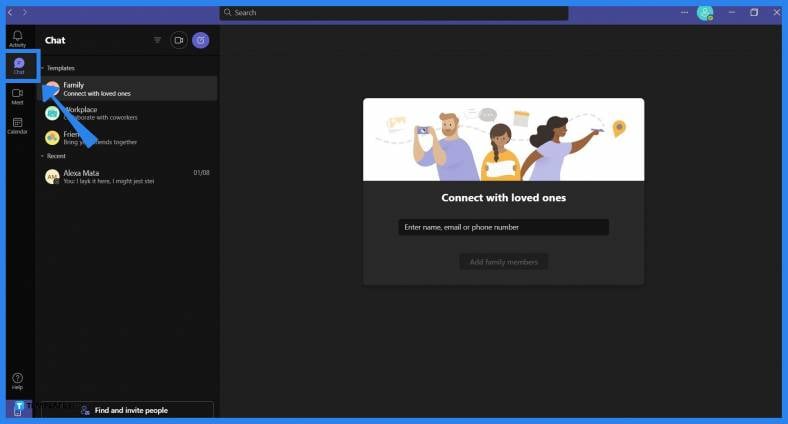
The Chat tab in Microsoft Teams allows the user to access their contacts list. To access the Chat tab in Microsoft Teams, the user will need to press the “Chat” button on the ribbon.
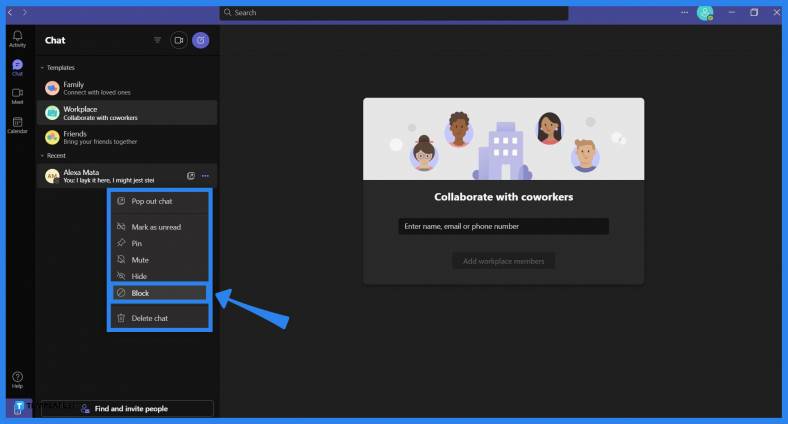
This list is sorted based on the most recent message they have sent to the user. To block a person in Microsoft Teams, the user must first locate the person they want to block, right-click their name, and select the Block option from the dropdown to immediately block the person from your contacts list.
Microsoft Office will block the chosen person’s Microsoft Office Account for an indefinite period, which will last until the user decides to unblock the person.
Yes, you can unblock a person on your contacts list in Microsoft Teams, which can be done by first opening the Settings dropdown via the ··· button, selecting the “Settings” button to open the Settings window, choosing the Privacy tab, clicking the Edit Blocked Contacts option, picking a contact to unblock, and finally left-clicking the “Unblock” button to unblock the person.
No, Microsoft Teams does not automatically delete the user from your contact list when you block or unblock them; if the user wants to delete the person from their contact list, they may do so by opening Microsoft Outlook on their web browser and deleting them from the contact list through Microsoft Outlook.
No, the blocked person will not be notified outright by Microsoft Teams or any of the Microsoft Office software; instead, the user can surmise they have been blocked as this function prevents them from tagging, mentioning, and messaging you directly.
Yes, when you block someone in Microsoft Teams, they will not be able to message or interact with you directly, but if both you and the blocked person are on the same group chat or team, they may message or mention you through there instead.

Signatures found in documents establish who you are as an individual or as an organization. Aside from the fact that…
![How To Make/Create a Newsletter in Microsoft Outlook [Templates + Examples] 2026](https://images.template.net/wp-content/uploads/2022/07/How-to-Start-a-Newsletter-with-Microsoft-Outlook-788x443.jpg)
Newsletters enable companies and organizations to communicate relevant and helpful information to their client, prospects, and subscribers. By giving you…
![How To Make/Create a Booklet in Microsoft Publisher [Templates + Examples] 2026](https://images.template.net/wp-content/uploads/2022/08/How-To-Make_Create-a-Booklet-in-Microsoft-Publisher-788x443.png)
Booklet templates are pre-designed layouts that make it easy to create a professional-looking booklet. They typically include placeholders for text…
![How To Make/Create a Booklet in Microsoft PowerPoint [Templates + Examples] 2026](https://images.template.net/wp-content/uploads/2022/07/How-To-Make-Create-a-Booklet-in-Microsoft-PowerPoint-788x443.jpg)
Booklets can be created in Microsoft PowerPoint, which offers a design feature that allows users to display them in PPT…
![How to Automatically Fill PDF Forms Using Microsoft Excel [Templates + Examples] 2026](https://images.template.net/wp-content/uploads/2022/07/How-to-Automatically-Fill-PDF-Forms-Using-Microsoft-Excel-788x444.png)
Automatically fill PDF forms using Microsoft Excel so you won’t have to save multiple PDF forms in an Excel spreadsheet…
![How to Make/Create a Floor Plan on Microsoft Excel [Templates + Examples] 2026](https://images.template.net/wp-content/uploads/2022/07/How-to-Make-a-Floor-Plan-on-Microsoft-Excel-788x443.jpg)
Floor plans either make or break projects related to engineering and architecture. That being said, every apartment room, bedroom, living…
![How to Make/Create a Grid in Microsoft Word [Templates + Examples] 2026](https://images.template.net/wp-content/uploads/2022/07/How-to-Make_Create-a-Grid-in-Microsoft-Word-788x444.jpg)
Grids consist of a network of lines that work as graphic cues while formatting your document in Microsoft Office. If…
![How to Add More Highlight Colors to Microsoft Word [Templates + Examples] 2026](https://images.template.net/wp-content/uploads/2022/07/How-to-Add-More-Highlight-Colors-to-Microsoft-Word-Templates-Examples-2023-788x443.jpg)
Add more highlight colors to Microsoft Word so you won’t have to settle with the default shading color in marking…
![How to Make/Create a Border in Microsoft Publisher [Templates + Examples] 2026](https://images.template.net/wp-content/uploads/2022/08/How-to-MakeCreate-a-Border-in-Microsoft-Publisher-788x444.png)
Borders are graphic design elements that make a document more pleasing and stylish to look at. This can be used…