


![How to Add a Signature in Microsoft Forms [Templates + Examples] 2026](https://images.template.net/wp-content/uploads/2022/07/How-to-Add-a-Signature-in-Microsoft-Forms-Templates-Examples-2023-788x443.jpg)
How to Add a Signature in Microsoft Forms [Templates + Examples] 2026
Signatures found in documents establish who you are as an individual or as an organization. Aside from the fact that…
Dec 22, 2025


Feb 26, 2026
Microsoft Forms is a useful tool for professionals to create surveys and polls. This allows you to gather responses in real time, which makes it convenient for owners to track the data.
If you want to build structured surveys quickly without starting from scratch, using a form maker can help you create organized questionnaires with ready-to-share layouts and automated response tracking. For faster setup and consistent formatting, you can also start with a Form template that already includes predefined fields, question formats, and response settings suitable for surveys and polls.
Since Microsoft Forms offers form owners the convenience of tracking responses, analyzing data will be done with ease. You can even share the form results with others such as colleagues so they can observe the respondents’ answers as well.
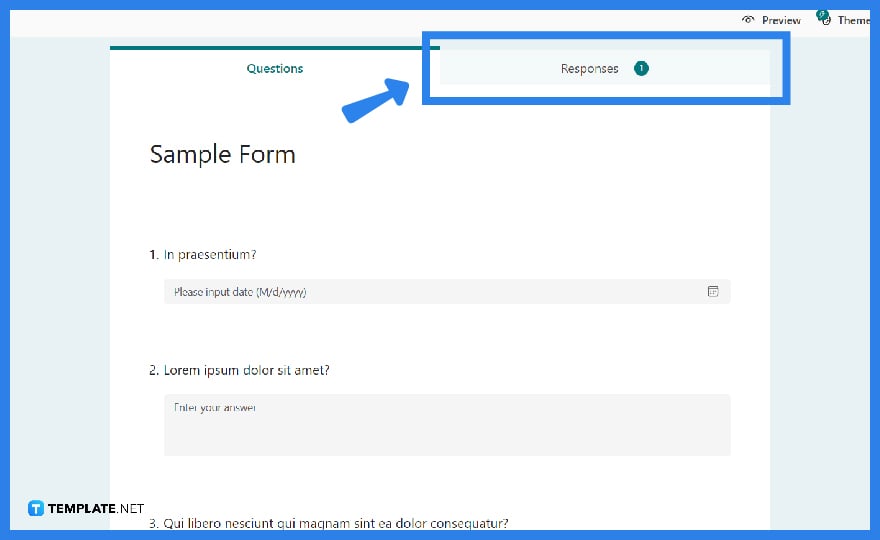
Open the form for which you intend to check the results in Microsoft Forms, and then click the “Responses” tab which can be found right beside the “Questions” tab. Review the contents whether or not you have received a satisfactory number of responses.
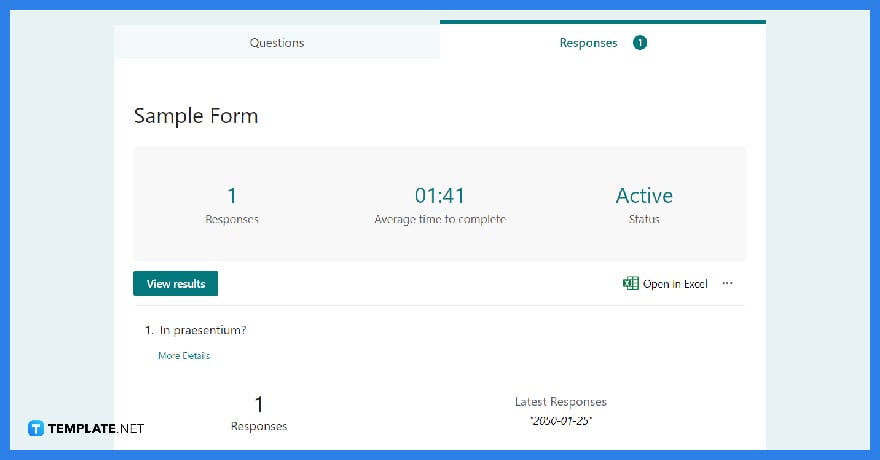
You will see summary statistics about your form, such as the number of replies and the average time it took respondents to complete your form, as well as a chart that gives a breakdown of responses. The summary of results may not be as comprehensive as you desire.
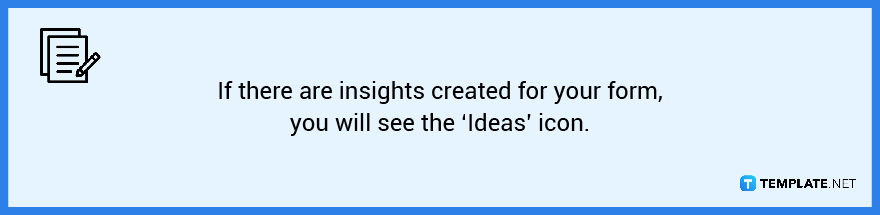
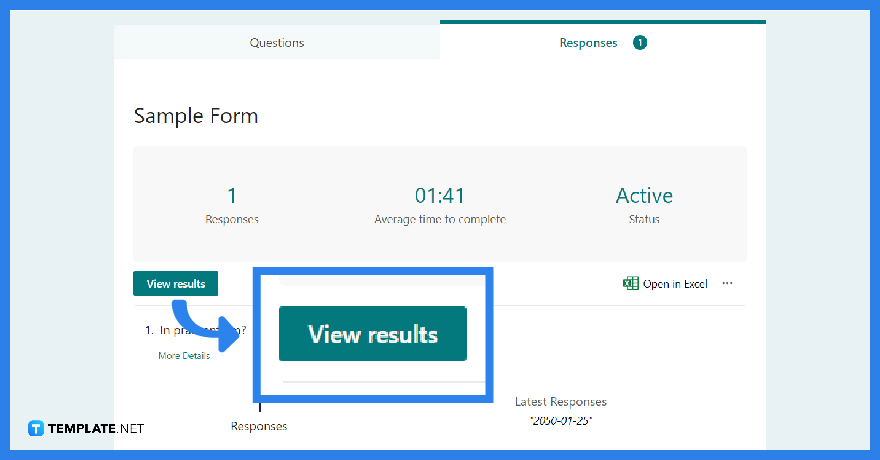
Alternatively, if you want a more comprehensive review of the results, skip the earlier step and immediately refer to this one. To access the specific information for each respondent, click “View results.” Toggle through the outcome details of other replies by using the left and right arrows.
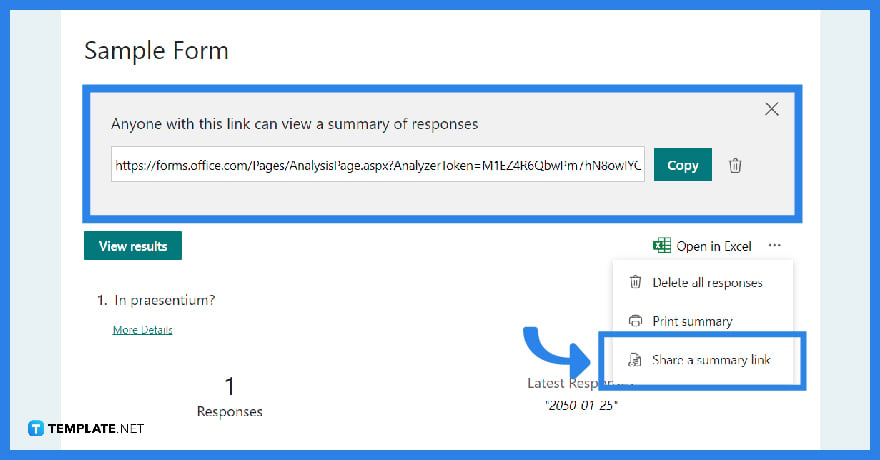
Your colleagues may want to check on the results themselves, to share the results, click on “More options.” Afterward, go to “Create a summary link” and then choose “Copy.” Doing so allows anyone who has the link to access and read a summary of answers to the contents of your form.
Modern AI tools can assist in analyzing collected responses, summarizing trends, and generating insights automatically to make data interpretation more efficient. You can also explore our free templates to download professionally designed forms compatible with Microsoft Forms, Word, and other document platforms.
Only the form’s owners can view the replies, but you can offer your colleague full access to administer the form and see the responses by clicking the “Share to Collaborate link” in the upper right.
Through Power Automate, “Convert HTML to Word” is now accessible internationally in all Microsoft Power Automate areas where the action converts an HTML file, HTML data, or a link results into a Microsoft Word document.
When a Microsoft Form is submitted, build a DOCX or PDF file from a template, which works as well with SharePoint, DropBox, Google Drive, and other storage systems and allows you to make applications, orders, invoices, and so on.
Send a link to the Microsoft Form to people outside your company, collect replies from those people, and work on the form with those people.
Go to the form’s settings and choose the “Anyone with the link” can respond option, which should address the problem and automatically authenticate people without requiring their identification.

Signatures found in documents establish who you are as an individual or as an organization. Aside from the fact that…
![How To Make/Create a Newsletter in Microsoft Outlook [Templates + Examples] 2026](https://images.template.net/wp-content/uploads/2022/07/How-to-Start-a-Newsletter-with-Microsoft-Outlook-788x443.jpg)
Newsletters enable companies and organizations to communicate relevant and helpful information to their client, prospects, and subscribers. By giving you…
![How To Make/Create a Booklet in Microsoft Publisher [Templates + Examples] 2026](https://images.template.net/wp-content/uploads/2022/08/How-To-Make_Create-a-Booklet-in-Microsoft-Publisher-788x443.png)
Booklet templates are pre-designed layouts that make it easy to create a professional-looking booklet. They typically include placeholders for text…
![How To Make/Create a Booklet in Microsoft PowerPoint [Templates + Examples] 2026](https://images.template.net/wp-content/uploads/2022/07/How-To-Make-Create-a-Booklet-in-Microsoft-PowerPoint-788x443.jpg)
Booklets can be created in Microsoft PowerPoint, which offers a design feature that allows users to display them in PPT…
![How to Automatically Fill PDF Forms Using Microsoft Excel [Templates + Examples] 2026](https://images.template.net/wp-content/uploads/2022/07/How-to-Automatically-Fill-PDF-Forms-Using-Microsoft-Excel-788x444.png)
Automatically fill PDF forms using Microsoft Excel so you won’t have to save multiple PDF forms in an Excel spreadsheet…
![How to Make/Create a Floor Plan on Microsoft Excel [Templates + Examples] 2026](https://images.template.net/wp-content/uploads/2022/07/How-to-Make-a-Floor-Plan-on-Microsoft-Excel-788x443.jpg)
Floor plans either make or break projects related to engineering and architecture. That being said, every apartment room, bedroom, living…
![How to Make/Create a Grid in Microsoft Word [Templates + Examples] 2026](https://images.template.net/wp-content/uploads/2022/07/How-to-Make_Create-a-Grid-in-Microsoft-Word-788x444.jpg)
Grids consist of a network of lines that work as graphic cues while formatting your document in Microsoft Office. If…
![How to Add More Highlight Colors to Microsoft Word [Templates + Examples] 2026](https://images.template.net/wp-content/uploads/2022/07/How-to-Add-More-Highlight-Colors-to-Microsoft-Word-Templates-Examples-2023-788x443.jpg)
Add more highlight colors to Microsoft Word so you won’t have to settle with the default shading color in marking…
![How to Make/Create a Border in Microsoft Publisher [Templates + Examples] 2026](https://images.template.net/wp-content/uploads/2022/08/How-to-MakeCreate-a-Border-in-Microsoft-Publisher-788x444.png)
Borders are graphic design elements that make a document more pleasing and stylish to look at. This can be used…