


![How to Add a Signature in Microsoft Forms [Templates + Examples] 2026](https://images.template.net/wp-content/uploads/2022/07/How-to-Add-a-Signature-in-Microsoft-Forms-Templates-Examples-2023-788x443.jpg)
How to Add a Signature in Microsoft Forms [Templates + Examples] 2026
Signatures found in documents establish who you are as an individual or as an organization. Aside from the fact that…
Dec 22, 2025


Sep 02, 2025
When Microsoft Teams is set to run in the background, it will not have any impact on the operation of either the computer or the app on its own, as when you receive a call, it will only show you a little window at the bottom right corner of the screen. However, there is an issue if Microsoft Teams keeps appearing on the screen even when it is set to the minimized position.
Integrations between Microsoft Teams, Skype, and Microsoft Office 365 have been made in order to improve the overall user experience. As a result, a toast message will appear in the lower right-hand corner of the screen if someone calls you, sends you a message, or mentions you in a conversation that’s taking place on Teams. The following are some easy solutions that prevent it from appearing on the screen in front of other applications.

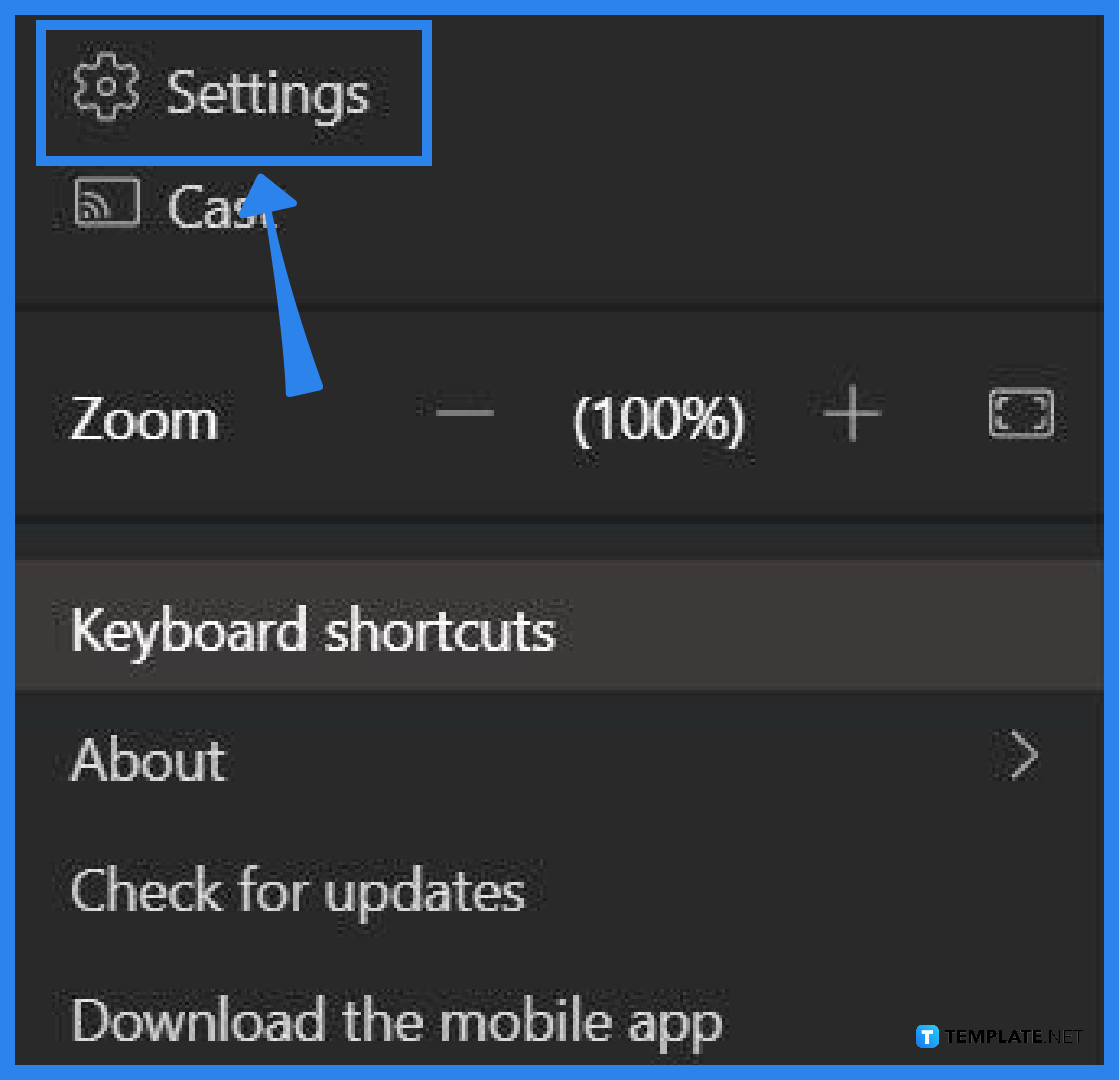
Start by launching your Microsoft Teams application. Beside your profile picture in the upper right-hand corner, click on the horizontal three-dot symbol.
After clicking the three-dot icon, a drop-down menu will pop up. The first option on the list should be Settings.
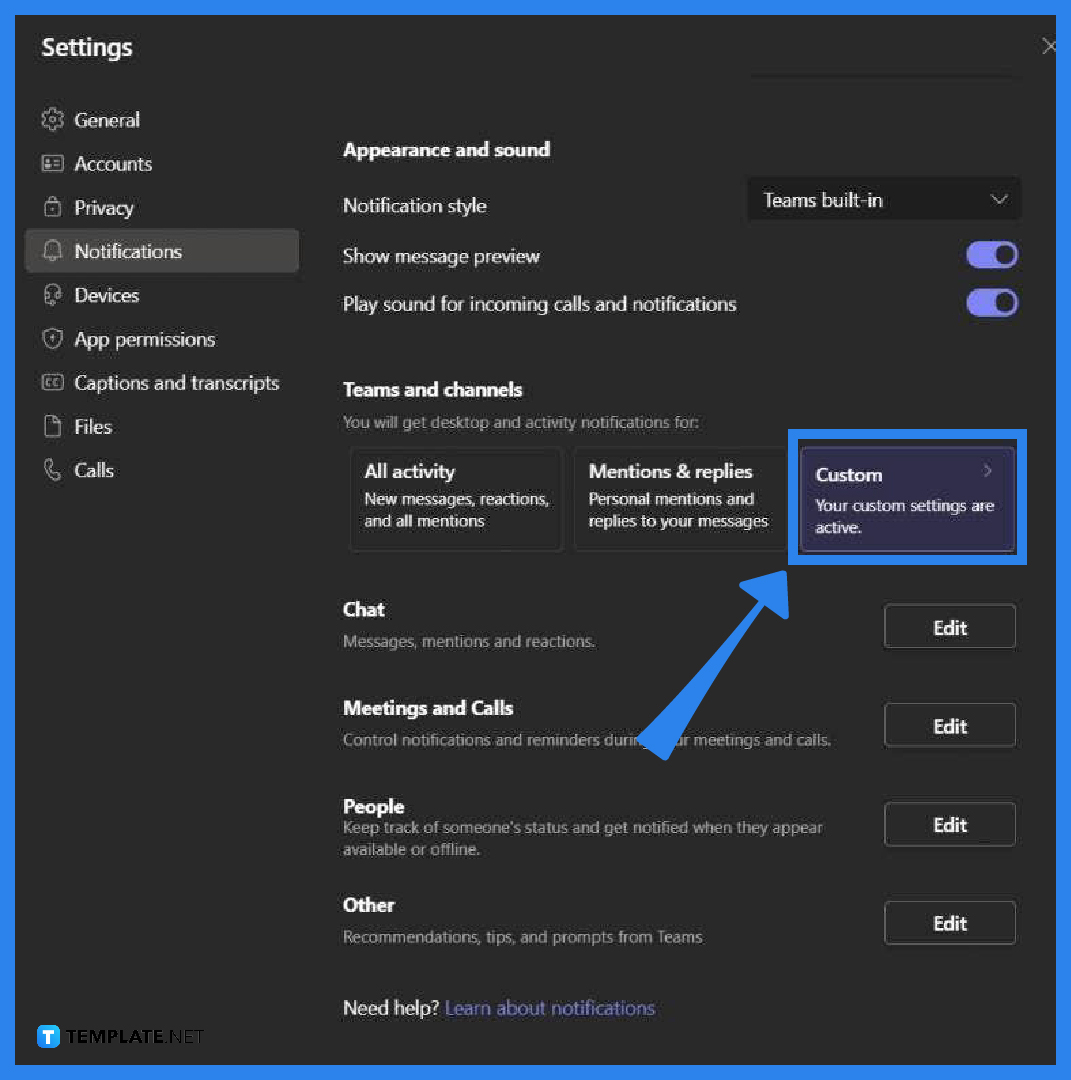
After clicking settings, go to the notifications tab. Under Teams and Channels, select the customs option.
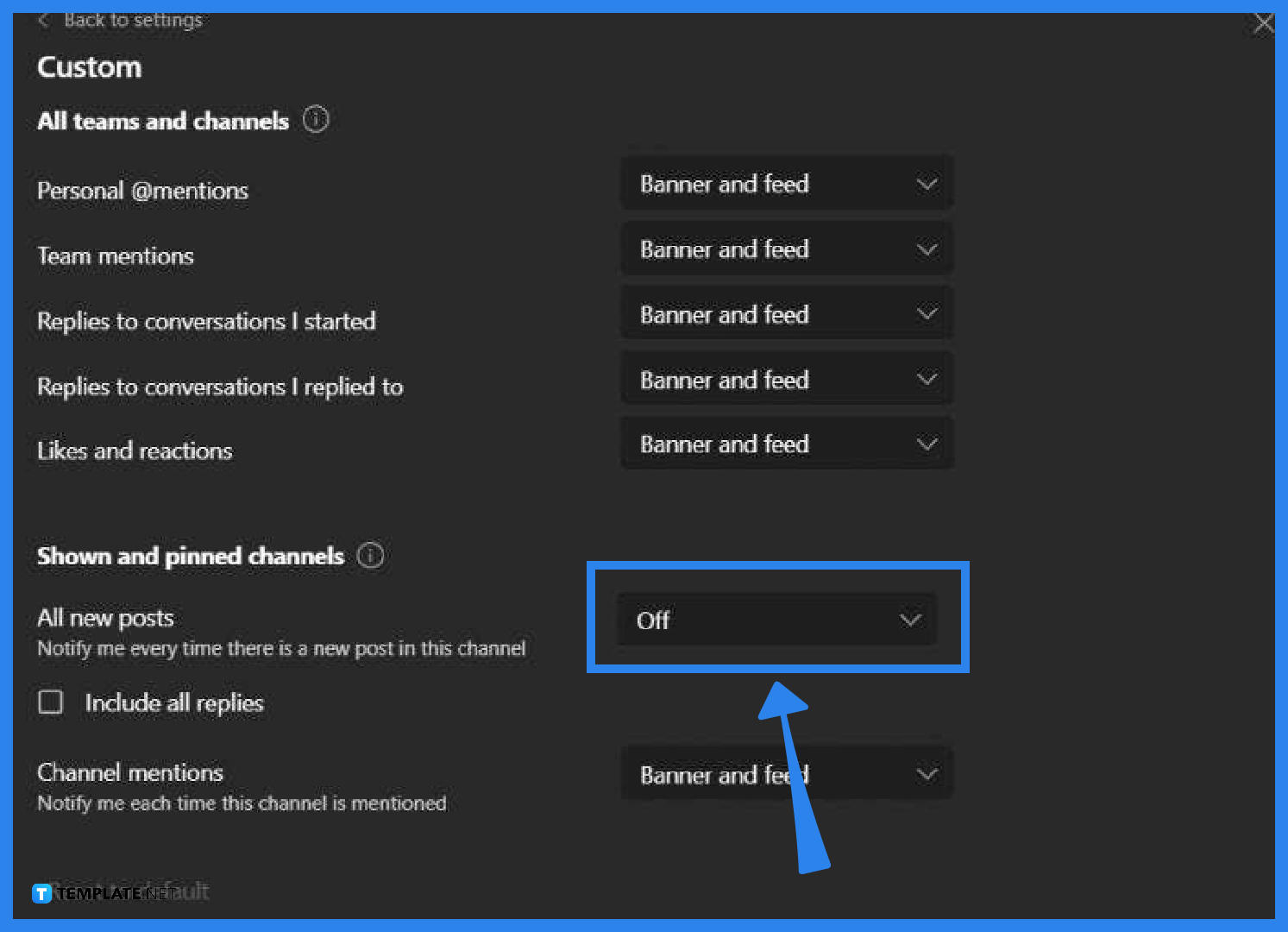
In this section, pick the Off option from the drop-down list for each of the categories whose alerts you do not wish to receive.
Go back to the Notifications settings. Click on edit next to Chats. Select Off.
Repeat the same process if you wish to turn off other types of notifications as well.
Only alerts from priority contacts will be let through when your Team’s status is set to Out of office or Do Not Disturb (DND), and you will be able to prevent pop-ups.
To access the Notifications menu in Teams, use the Menu> More button option. Tap Open settings. Select Teams under Notifications on the Menu. Turn on the toggle for Allow Notifications.
Microsoft Teams is a persistent chat-based collaboration tool that comes replete with document sharing, online meetings, and a great deal of other features that are incredibly helpful.
It is not a problem even if you change your mind and decide you do not want to continue receiving alerts for a particular chat because you can turn notifications off. Get started with a chat in a channel by going to the beginning of the conversation, then going to the upper right corner of the message and selecting More choices > Turn off notifications from the drop-down Menu.
Updating the appropriate application is the first step in solving any kind of problem that may have arisen.

Signatures found in documents establish who you are as an individual or as an organization. Aside from the fact that…
![How To Make/Create a Newsletter in Microsoft Outlook [Templates + Examples] 2026](https://images.template.net/wp-content/uploads/2022/07/How-to-Start-a-Newsletter-with-Microsoft-Outlook-788x443.jpg)
Newsletters enable companies and organizations to communicate relevant and helpful information to their client, prospects, and subscribers. By giving you…
![How To Make/Create a Booklet in Microsoft Publisher [Templates + Examples] 2026](https://images.template.net/wp-content/uploads/2022/08/How-To-Make_Create-a-Booklet-in-Microsoft-Publisher-788x443.png)
Booklet templates are pre-designed layouts that make it easy to create a professional-looking booklet. They typically include placeholders for text…
![How To Make/Create a Booklet in Microsoft PowerPoint [Templates + Examples] 2026](https://images.template.net/wp-content/uploads/2022/07/How-To-Make-Create-a-Booklet-in-Microsoft-PowerPoint-788x443.jpg)
Booklets can be created in Microsoft PowerPoint, which offers a design feature that allows users to display them in PPT…
![How to Automatically Fill PDF Forms Using Microsoft Excel [Templates + Examples] 2026](https://images.template.net/wp-content/uploads/2022/07/How-to-Automatically-Fill-PDF-Forms-Using-Microsoft-Excel-788x444.png)
Automatically fill PDF forms using Microsoft Excel so you won’t have to save multiple PDF forms in an Excel spreadsheet…
![How to Make/Create a Floor Plan on Microsoft Excel [Templates + Examples] 2026](https://images.template.net/wp-content/uploads/2022/07/How-to-Make-a-Floor-Plan-on-Microsoft-Excel-788x443.jpg)
Floor plans either make or break projects related to engineering and architecture. That being said, every apartment room, bedroom, living…
![How to Make/Create a Grid in Microsoft Word [Templates + Examples] 2026](https://images.template.net/wp-content/uploads/2022/07/How-to-Make_Create-a-Grid-in-Microsoft-Word-788x444.jpg)
Grids consist of a network of lines that work as graphic cues while formatting your document in Microsoft Office. If…
![How to Add More Highlight Colors to Microsoft Word [Templates + Examples] 2026](https://images.template.net/wp-content/uploads/2022/07/How-to-Add-More-Highlight-Colors-to-Microsoft-Word-Templates-Examples-2023-788x443.jpg)
Add more highlight colors to Microsoft Word so you won’t have to settle with the default shading color in marking…
![How to Make/Create a Border in Microsoft Publisher [Templates + Examples] 2026](https://images.template.net/wp-content/uploads/2022/08/How-to-MakeCreate-a-Border-in-Microsoft-Publisher-788x444.png)
Borders are graphic design elements that make a document more pleasing and stylish to look at. This can be used…