


![How to Add a Signature in Microsoft Forms [Templates + Examples] 2026](https://images.template.net/wp-content/uploads/2022/07/How-to-Add-a-Signature-in-Microsoft-Forms-Templates-Examples-2023-788x443.jpg)
How to Add a Signature in Microsoft Forms [Templates + Examples] 2026
Signatures found in documents establish who you are as an individual or as an organization. Aside from the fact that…
Dec 22, 2025


Sep 02, 2025
Microsoft SharePoint is one of the products within the Microsoft product suite where you can access more applications integrated into Office 365. Microsoft SharePoint allows users to edit and create collaborative projects online and in real time.
Because Microsoft’s products are integrated into Office 365, it has become possible to link and transfer documents from one application to another. This article will discuss how to connect Access database with Microsoft SharePoint.
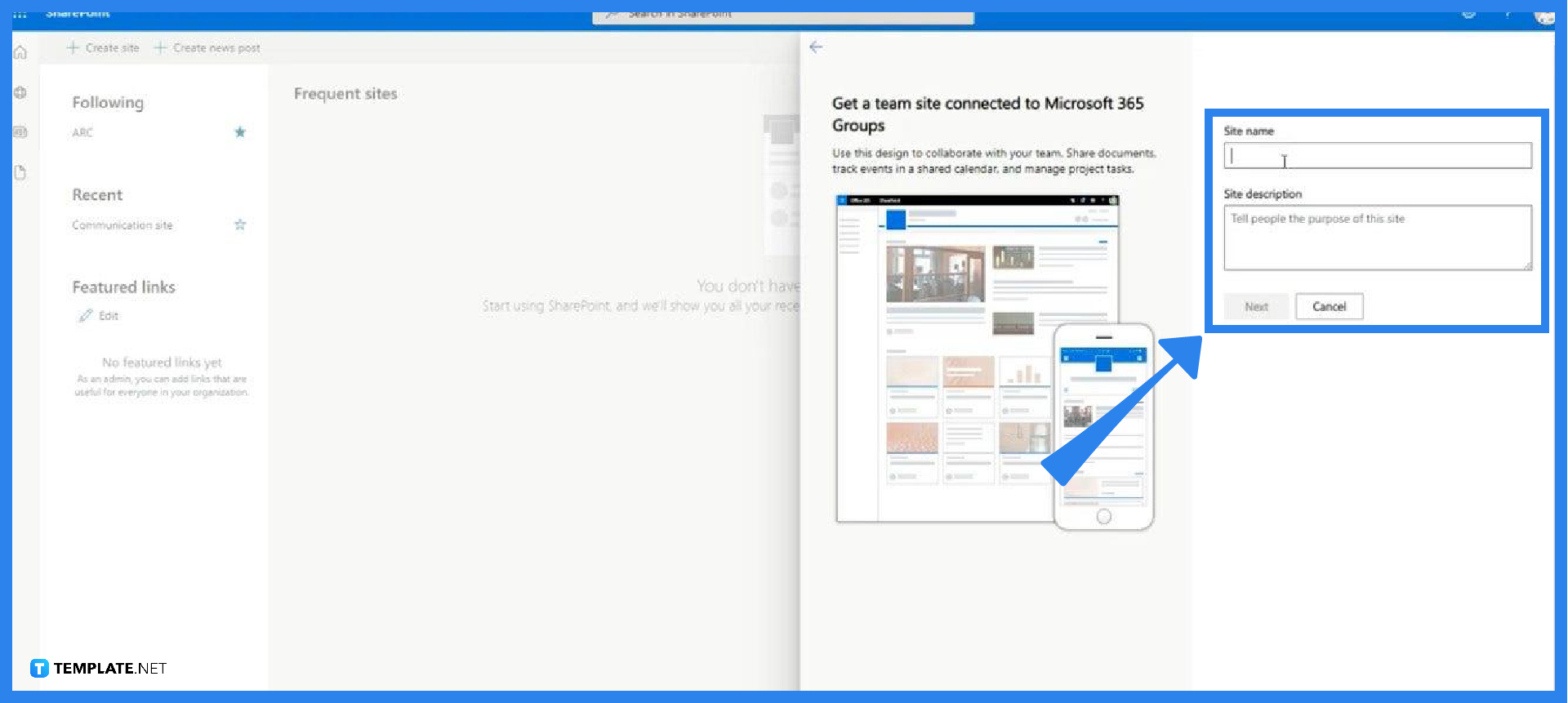
Log in to your Office 365 account and launch SharePoint then create a new site for your database. While filling out the information of the site, a URL will automatically be assigned for the site which you need to copy or take note of. You can also invite or add site owners and members from your organization so they can access the document in SharePoint.
After creating a site in SharePoint, open the database or document in Access. You can open the document on your desktop or online via your Office 365 account. Select the tables within the database you want to upload to SharePoint or highlight all the folders if you want to upload the entire database.
On the top ribbon, click Database Tools and click SharePoint. A pop-up window will appear and prompt you to link the database to SharePoint by pasting the URL of the site you created. Once you click Next, Access will immediately upload or export your file to your site in SharePoint.
This step is when you want to link the list from SharePoint to your database in Access. To do that, open your file in Access then under External Data, point your mouse to New Data Source. A menu will appear and from there click From Online Services > SharePoint List. Select the correct URL of the site you created, click Next, tick the boxes of all the contents you want to be available to your database, and start syncing your file from SharePoint to Access by clicking OK.
You may not be able to open the file in SharePoint because you don’t have permission to access it; ask the site owner to add you as a member or a site owner.
A Contribute permission means that you can make data changes but not make design changes.
After exporting data from Access to SharePoint, the tables become lists that let you take advantage of other capabilities in SharePoint.
While the changes you make in SharePoint reflect in Access, you can’t add, remove, or modify the fields in a table linked to SharePoint via Access.
Some of the benefits of linking data between SharePoint and Access include the ability to work offline, edit in bulk, use SharePoint to make an Access table, track issues, and track history changes among others.

Signatures found in documents establish who you are as an individual or as an organization. Aside from the fact that…
![How To Make/Create a Newsletter in Microsoft Outlook [Templates + Examples] 2026](https://images.template.net/wp-content/uploads/2022/07/How-to-Start-a-Newsletter-with-Microsoft-Outlook-788x443.jpg)
Newsletters enable companies and organizations to communicate relevant and helpful information to their client, prospects, and subscribers. By giving you…
![How To Make/Create a Booklet in Microsoft Publisher [Templates + Examples] 2026](https://images.template.net/wp-content/uploads/2022/08/How-To-Make_Create-a-Booklet-in-Microsoft-Publisher-788x443.png)
Booklet templates are pre-designed layouts that make it easy to create a professional-looking booklet. They typically include placeholders for text…
![How To Make/Create a Booklet in Microsoft PowerPoint [Templates + Examples] 2026](https://images.template.net/wp-content/uploads/2022/07/How-To-Make-Create-a-Booklet-in-Microsoft-PowerPoint-788x443.jpg)
Booklets can be created in Microsoft PowerPoint, which offers a design feature that allows users to display them in PPT…
![How to Automatically Fill PDF Forms Using Microsoft Excel [Templates + Examples] 2026](https://images.template.net/wp-content/uploads/2022/07/How-to-Automatically-Fill-PDF-Forms-Using-Microsoft-Excel-788x444.png)
Automatically fill PDF forms using Microsoft Excel so you won’t have to save multiple PDF forms in an Excel spreadsheet…
![How to Make/Create a Floor Plan on Microsoft Excel [Templates + Examples] 2026](https://images.template.net/wp-content/uploads/2022/07/How-to-Make-a-Floor-Plan-on-Microsoft-Excel-788x443.jpg)
Floor plans either make or break projects related to engineering and architecture. That being said, every apartment room, bedroom, living…
![How to Make/Create a Grid in Microsoft Word [Templates + Examples] 2026](https://images.template.net/wp-content/uploads/2022/07/How-to-Make_Create-a-Grid-in-Microsoft-Word-788x444.jpg)
Grids consist of a network of lines that work as graphic cues while formatting your document in Microsoft Office. If…
![How to Add More Highlight Colors to Microsoft Word [Templates + Examples] 2026](https://images.template.net/wp-content/uploads/2022/07/How-to-Add-More-Highlight-Colors-to-Microsoft-Word-Templates-Examples-2023-788x443.jpg)
Add more highlight colors to Microsoft Word so you won’t have to settle with the default shading color in marking…
![How to Make/Create a Border in Microsoft Publisher [Templates + Examples] 2026](https://images.template.net/wp-content/uploads/2022/08/How-to-MakeCreate-a-Border-in-Microsoft-Publisher-788x444.png)
Borders are graphic design elements that make a document more pleasing and stylish to look at. This can be used…