


![How to Add a Signature in Microsoft Forms [Templates + Examples] 2026](https://images.template.net/wp-content/uploads/2022/07/How-to-Add-a-Signature-in-Microsoft-Forms-Templates-Examples-2023-788x443.jpg)
How to Add a Signature in Microsoft Forms [Templates + Examples] 2026
Signatures found in documents establish who you are as an individual or as an organization. Aside from the fact that…
Dec 22, 2025


Sep 02, 2025
The Microsoft Office Suite includes Microsoft Access, a database program that enables users to enter data, manage it, and produce small or large reports. This is a perfect application for individuals who want to correctly and rapidly organize data.
Microsoft Access is a DBMS tool for producing reports, resumes, and other data-based documents. The application is available online for a free trial download.
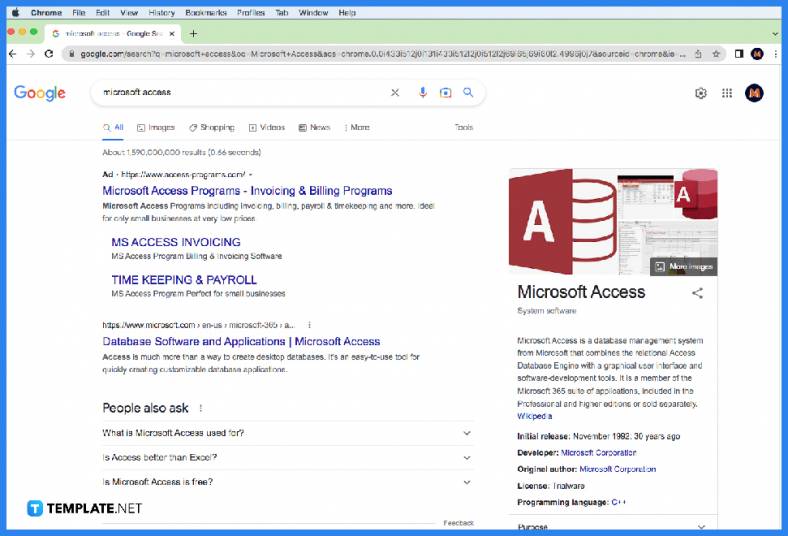
The first step requires you to go to your preferred browser: Google Chrome, Internet Explorer, or Microsoft Edge. After that, search for Microsoft Access in the search bar and press Enter. Then, choose a website that offers a free download for Microsoft Access. For example, softonic.com provides a free Microsoft Access download.
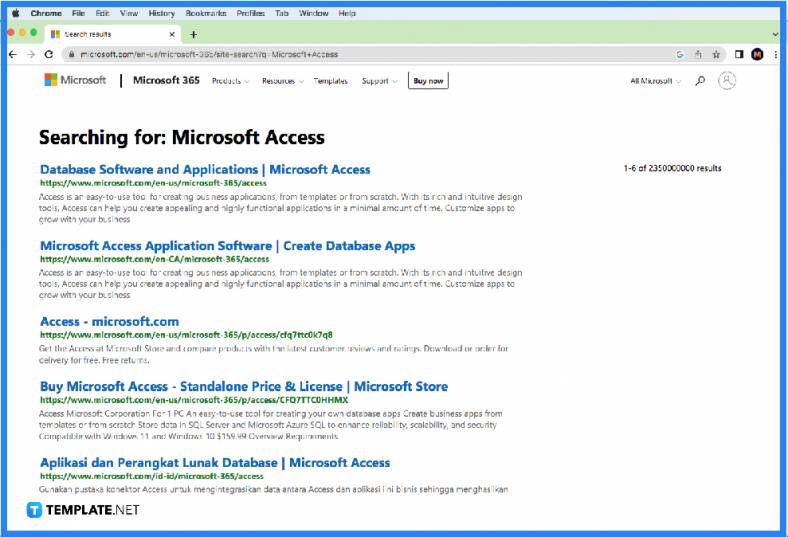
Once you have chosen a reliable website, find the link and click on it for a free Microsoft Access trial for the most recent version of the program. Then, click on the green download button that appears on the website. On the following page, click on the “Continue to Download” option, redirecting you to Microsoft’s webpage. After that, you select the “Try 1 Month Free” option for you to download the Office Professional on a trial basis. This trial contains Microsoft Access software.

Microsoft Access is a software tool that was first made available in 1992 and employs data management to generate queries and reports that can be transferred into other programs like Microsoft Excel.
Microsoft Access has many benefits for managing and organizing data, including centralizing information that is dispersed across numerous Microsoft Excel worksheets or workbooks or other file types, producing customized data entry forms with lookups, checkboxes, list-boxes, and text boxes that can be easily filtered, allowing multiple users to access and edit data at once, creating standardized reports that can be printed, faxed, emailed, exported to Microsoft Excel, transferred to Microsoft Word, linked to Microsoft SharePoint lists, and many more.
The range of applications that may be created with Microsoft Access is practically endless; to name a few, there are those for accounting, order management, inventory, contact management, estimating, and project management.
Yes, Microsoft Access is a multi-user program that allows multiple users to interact with a database at once, and these users can share a single file to provide them access to the forms, reports, and data.
The basic desktop version of Microsoft Access can be used without any special hardware or license requirements. For that reason, both individuals and teams can download it at no additional cost.

Signatures found in documents establish who you are as an individual or as an organization. Aside from the fact that…
![How To Make/Create a Newsletter in Microsoft Outlook [Templates + Examples] 2026](https://images.template.net/wp-content/uploads/2022/07/How-to-Start-a-Newsletter-with-Microsoft-Outlook-788x443.jpg)
Newsletters enable companies and organizations to communicate relevant and helpful information to their client, prospects, and subscribers. By giving you…
![How To Make/Create a Booklet in Microsoft Publisher [Templates + Examples] 2026](https://images.template.net/wp-content/uploads/2022/08/How-To-Make_Create-a-Booklet-in-Microsoft-Publisher-788x443.png)
Booklet templates are pre-designed layouts that make it easy to create a professional-looking booklet. They typically include placeholders for text…
![How To Make/Create a Booklet in Microsoft PowerPoint [Templates + Examples] 2026](https://images.template.net/wp-content/uploads/2022/07/How-To-Make-Create-a-Booklet-in-Microsoft-PowerPoint-788x443.jpg)
Booklets can be created in Microsoft PowerPoint, which offers a design feature that allows users to display them in PPT…
![How to Automatically Fill PDF Forms Using Microsoft Excel [Templates + Examples] 2026](https://images.template.net/wp-content/uploads/2022/07/How-to-Automatically-Fill-PDF-Forms-Using-Microsoft-Excel-788x444.png)
Automatically fill PDF forms using Microsoft Excel so you won’t have to save multiple PDF forms in an Excel spreadsheet…
![How to Make/Create a Floor Plan on Microsoft Excel [Templates + Examples] 2026](https://images.template.net/wp-content/uploads/2022/07/How-to-Make-a-Floor-Plan-on-Microsoft-Excel-788x443.jpg)
Floor plans either make or break projects related to engineering and architecture. That being said, every apartment room, bedroom, living…
![How to Make/Create a Grid in Microsoft Word [Templates + Examples] 2026](https://images.template.net/wp-content/uploads/2022/07/How-to-Make_Create-a-Grid-in-Microsoft-Word-788x444.jpg)
Grids consist of a network of lines that work as graphic cues while formatting your document in Microsoft Office. If…
![How to Add More Highlight Colors to Microsoft Word [Templates + Examples] 2026](https://images.template.net/wp-content/uploads/2022/07/How-to-Add-More-Highlight-Colors-to-Microsoft-Word-Templates-Examples-2023-788x443.jpg)
Add more highlight colors to Microsoft Word so you won’t have to settle with the default shading color in marking…
![How to Make/Create a Border in Microsoft Publisher [Templates + Examples] 2026](https://images.template.net/wp-content/uploads/2022/08/How-to-MakeCreate-a-Border-in-Microsoft-Publisher-788x444.png)
Borders are graphic design elements that make a document more pleasing and stylish to look at. This can be used…