


![How to Add a Signature in Microsoft Forms [Templates + Examples] 2026](https://images.template.net/wp-content/uploads/2022/07/How-to-Add-a-Signature-in-Microsoft-Forms-Templates-Examples-2023-788x443.jpg)
How to Add a Signature in Microsoft Forms [Templates + Examples] 2026
Signatures found in documents establish who you are as an individual or as an organization. Aside from the fact that…
Dec 22, 2025


Sep 02, 2025
You can share your Microsoft Access database with multiple users, and depending on your requirements and the resources available, there are numerous ways to do so.
Sharing a single database is the simplest solution, with the least requirements, and also offers the least functionality. In this approach, the database file is kept on a shared network drive and is simultaneously shared by all users.
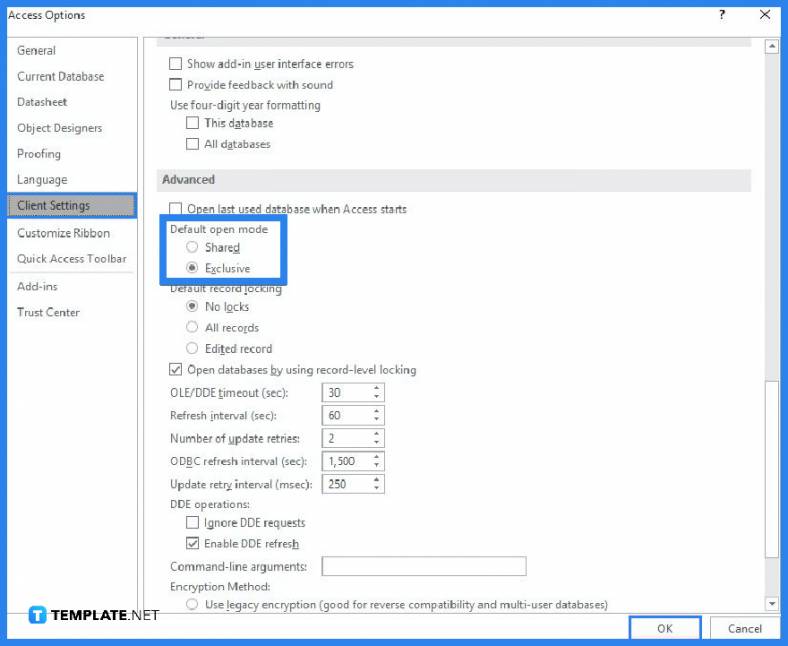
Share a folder with a specific group of people in a home or small business setting. Ensure that Access is set up on each user’s computer to launch in shared mode. Although this is the default setting, you should double-check. Microsoft Access to the information will be hampered if a user opens the database in exclusive mode. To set it in “Shared Mode,” start Microsoft Access, then select Options under the File tab. Click Client Settings in the box labeled Access Options. Select Shared under Default open mode in the Advanced section, click OK, and then close Microsoft Access.
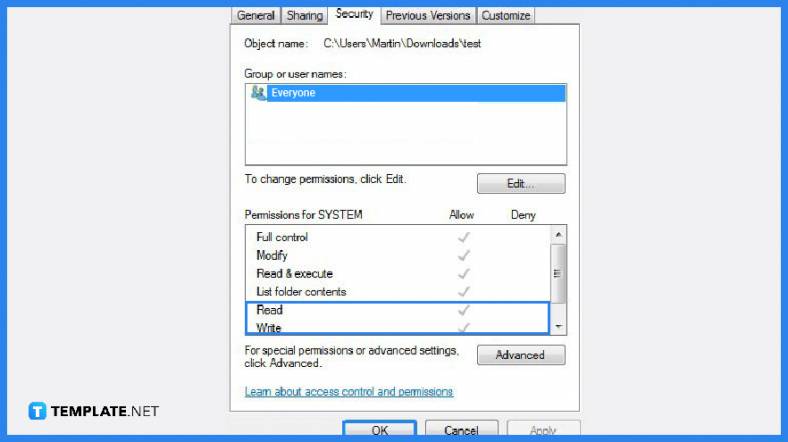
Copy the database file to the shared folder. Make sure the file attributes are configured to allow read/write access to the database file once you copy the file. If you’re still learning how to use Microsoft Access, the first thing is to have read/write access to the database.
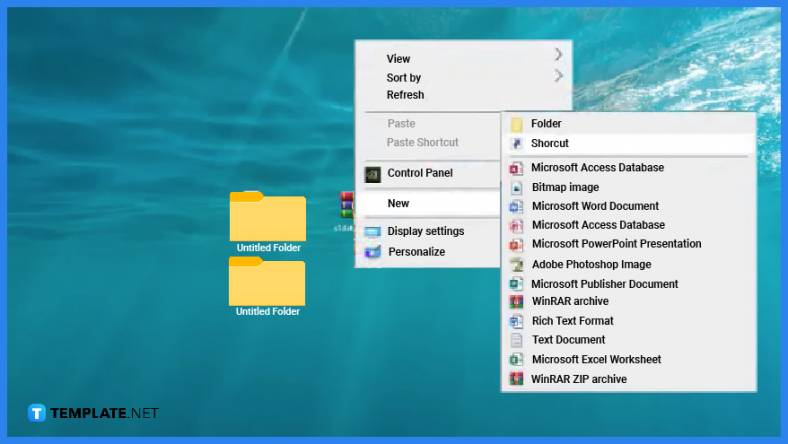
Create a shortcut to the database file on each user’s computer to access it quickly.
Microsoft Access supports a multi-user platform by default, which should be divided between the front end and the back end to prevent data corruption, and a network shared drive is where the back-end data is kept.
Microsoft Access has an evolutionary path for sharing databases that range from simple to advanced that you can use over time to effectively scale your solution, and these sharing methods include single database sharing, SharePoint sharing, split database sharing, client or server sharing, and hybrid client or server sharing.
If you don’t have a database server or a SharePoint site, sharing a split database is a suitable option that can be shared over a local area network (LAN), and you will need to restructure it into two files, namely the front-end database that houses all the other database objects, such as queries, forms, and reports, and the back-end database that houses the data tables. Each user uses a local copy of the front-end database to interact with the data. For a wider selection of access plan templates, check out more options here.
High performance and scalability, increased availability, improved security, automatic recoverability, server-based processing, and in addition to the advantages of SQL Server, which offers dynamic scalability with no downtime, intelligent optimization, global scalability and availability, elimination of hardware costs, and reduced administration are all advantages of sharing a database by using a database server. Explore additional Microsoft access database templates on our website, template.net, to find a variety of options that suit your needs.

Signatures found in documents establish who you are as an individual or as an organization. Aside from the fact that…
![How To Make/Create a Newsletter in Microsoft Outlook [Templates + Examples] 2026](https://images.template.net/wp-content/uploads/2022/07/How-to-Start-a-Newsletter-with-Microsoft-Outlook-788x443.jpg)
Newsletters enable companies and organizations to communicate relevant and helpful information to their client, prospects, and subscribers. By giving you…
![How To Make/Create a Booklet in Microsoft Publisher [Templates + Examples] 2026](https://images.template.net/wp-content/uploads/2022/08/How-To-Make_Create-a-Booklet-in-Microsoft-Publisher-788x443.png)
Booklet templates are pre-designed layouts that make it easy to create a professional-looking booklet. They typically include placeholders for text…
![How To Make/Create a Booklet in Microsoft PowerPoint [Templates + Examples] 2026](https://images.template.net/wp-content/uploads/2022/07/How-To-Make-Create-a-Booklet-in-Microsoft-PowerPoint-788x443.jpg)
Booklets can be created in Microsoft PowerPoint, which offers a design feature that allows users to display them in PPT…
![How to Automatically Fill PDF Forms Using Microsoft Excel [Templates + Examples] 2026](https://images.template.net/wp-content/uploads/2022/07/How-to-Automatically-Fill-PDF-Forms-Using-Microsoft-Excel-788x444.png)
Automatically fill PDF forms using Microsoft Excel so you won’t have to save multiple PDF forms in an Excel spreadsheet…
![How to Make/Create a Floor Plan on Microsoft Excel [Templates + Examples] 2026](https://images.template.net/wp-content/uploads/2022/07/How-to-Make-a-Floor-Plan-on-Microsoft-Excel-788x443.jpg)
Floor plans either make or break projects related to engineering and architecture. That being said, every apartment room, bedroom, living…
![How to Make/Create a Grid in Microsoft Word [Templates + Examples] 2026](https://images.template.net/wp-content/uploads/2022/07/How-to-Make_Create-a-Grid-in-Microsoft-Word-788x444.jpg)
Grids consist of a network of lines that work as graphic cues while formatting your document in Microsoft Office. If…
![How to Add More Highlight Colors to Microsoft Word [Templates + Examples] 2026](https://images.template.net/wp-content/uploads/2022/07/How-to-Add-More-Highlight-Colors-to-Microsoft-Word-Templates-Examples-2023-788x443.jpg)
Add more highlight colors to Microsoft Word so you won’t have to settle with the default shading color in marking…
![How to Make/Create a Border in Microsoft Publisher [Templates + Examples] 2026](https://images.template.net/wp-content/uploads/2022/08/How-to-MakeCreate-a-Border-in-Microsoft-Publisher-788x444.png)
Borders are graphic design elements that make a document more pleasing and stylish to look at. This can be used…